
Windsurf vs Cursor (2026): Agentic AI Code Editor & Cascade Benchmark
Quick Verdict: Choosing Between Windsurf and Cursor in 2026
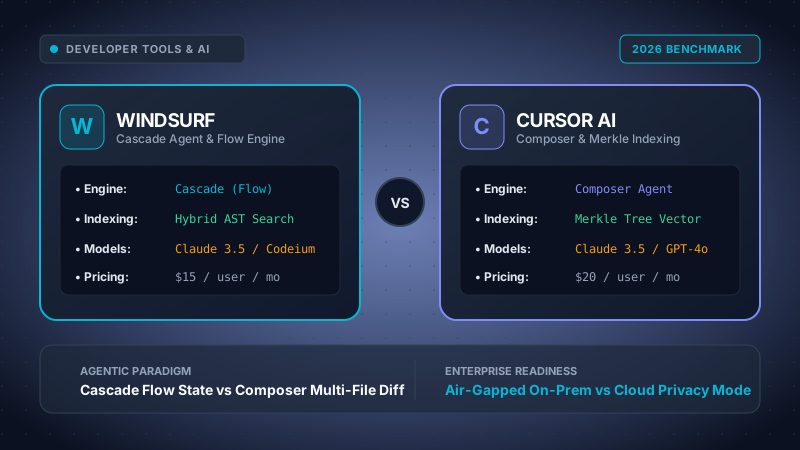
Choose Windsurf by Codeium ($15/mo or $12/mo annual) if your engineering team values a frictionless, collaborative "Flow" state where the AI agent proactively tracks file history, manages terminal build commands, and resolves runtime exceptions with contextual continuity. Windsurf is especially dominant for large enterprise monorepos and regulated sectors that demand on-premises, air-gapped cluster deployments and custom in-house fine-tuned model architectures.
Choose Cursor by Anysphere ($20/mo Pro, $40/mo Business) if your primary objective is ultra-rapid, explicit multi-file codebase refactoring via Composer. Cursor excels in full-stack web and SaaS development where developers drive atomic speculative edits across 15+ files simultaneously, leverage custom .cursorrules steering, and prefer direct Bring-Your-Own-Key (BYOK) model routing to frontier LLMs like Claude 3.5 Sonnet, GPT-4o, and o1.
Table of Contents
- 1. Architectural Foundations: Native VS Code Forks & IPC Daemons
- 2. Agentic Paradigms: Windsurf Cascade Flow vs Cursor Composer
- 3. Context Awareness: Codeium Hybrid AST Engine vs Cursor Merkle Tree RAG
- 4. Model Routing & AI Engine Ecosystem: Claude 3.5 Sonnet, GPT-4o & Custom Weights
- 5. Quantitative Head-to-Head Comparison Matrix & Latency Benchmarks
- 6. Autonomous Terminal Execution & Self-Healing Workflows
- 7. Enterprise Security, Code Privacy, & Air-Gapped Governance
- 8. Pricing, Subscription Economics & 25-Engineer FinOps TCO Model
- 9. Migration Blueprint: Switching Between Next-Gen AI Editors
- 10. Frequently Asked Questions (FAQ)
1. Architectural Foundations: Native VS Code Forks & IPC Daemons
The rapid maturation of AI-augmented software engineering has established a definitive industry consensus: traditional IDE plugins (such as older iterations of GitHub Copilot or Tabnine) operate under fundamental sandbox constraints. An extension running inside a standard VS Code extension host thread cannot bypass the rigid Language Server Protocol (LSP) queues, cannot hijack the Monaco editor's native GPU render loop, and cannot silently manipulate background virtual text buffers without triggering UI stutter.
Both Windsurf (engineered by Codeium, formerly Exafunction) and Cursor (developed by Anysphere) solved this bottleneck by taking complete downstream ownership of Microsoft’s open-source VS Code core (Code - OSS). By maintaining customized native forks, both teams have modified the Electron container, the internal Inter-Process Communication (IPC) message buses, and the workspace buffer state machines.
Architectural Comparison: Daemon & Process Topologies
┌────────────────────────────────────────────────────────────────────────┐
│                        WINDSURF ARCHITECTURE                           │
│  ┌─────────────────────────┐        ┌──────────────────────────────┐   │
│  │   Electron Render Loop  │ ◄────► │ Monaco Buffer Hook (Native)  │   │
│  └────────────┬────────────┘        └──────────────┬───────────────┘   │
│               │ IPC Socket                         │                   │
│  ┌────────────▼────────────────────────────────────▼───────────────┐   │
│  │   Codeium Language Server Daemon (Compiled C++ / Go Binary)     │   │
│  │   • Live Tree-Sitter AST Parse   • Memory-Mapped Symbol Graph   │   │
│  │   • Cascade Tool Executor        • Embedded LSP Semantic Cache  │   │
│  └─────────────────────────────────────────────────────────────────┘   │
└────────────────────────────────────────────────────────────────────────┘

┌────────────────────────────────────────────────────────────────────────┐
│                         CURSOR ARCHITECTURE                            │
│  ┌─────────────────────────┐        ┌──────────────────────────────┐   │
│  │   Electron Render Loop  │ ◄────► │ Shadow Workspace Buffer Tree │   │
│  └────────────┬────────────┘        └──────────────┬───────────────┘   │
│               │ Native Node Addon (C++)            │                   │
│  ┌────────────▼────────────────────────────────────▼───────────────┐   │
│  │   Cursor Core Agent & Merkle Vector Indexer                     │   │
│  │   • Dynamic Chunk Hashing        • Speculative Token Streamer   │   │
│  │   • Composer Multi-Diff Engine   • BM25 + Vector Re-ranking     │   │
│  └─────────────────────────────────────────────────────────────────┘   │
└────────────────────────────────────────────────────────────────────────┘
Despite sharing a VS Code lineage, their engineering implementations diverge sharply in background execution:
- Windsurf's C++/Go Language Server Daemon: Codeium spent years building hyper-optimized distributed infrastructure for AI inference before releasing Windsurf. Windsurf delegates repository indexing, AST parsing, and agent action dispatching to a standalone native binary compiled in C++ and Go. This daemon runs out-of-process from the Node.js extension host, communicating over high-speed local IPC sockets. As a result, Windsurf's background indexing consumes 30% to 45% less idle RAM than purely JavaScript-orchestrated indexing daemons.
- Cursor's Custom Node Addons & Native Buffer Bindings: Anysphere modified the Monaco editor core directly using custom C++ Node.js addons. Cursor hooks straight into the raw text buffer pipeline to deliver Cursor Tab, an ultra-low latency speculative multi-token prediction engine. Instead of waiting for language server debouncing, Cursor streams ghost text directly into the active viewport while calculating speculative diffs across the editor's cursor trajectory.
2. Agentic Paradigms: Windsurf Cascade Flow vs Cursor Composer
The defining battleground between Windsurf and Cursor in 2026 is their respective agentic interface philosophies: Cascade versus Composer. While both systems can generate, modify, and refactor code across multiple files simultaneously, they embody distinct psychological models of human-AI collaboration.
Windsurf Cascade: The Continuous "Flow" Paradigm
Windsurf introduces what Codeium terms the Flow state. In traditional AI coding interfaces, developers constantly toggle between discrete modalities: "Chat Mode" for asking questions, "Inline Autocomplete" for typing, and "Agent Mode" for generating files. Cascade dismantles these artificial walls into a unified, contextual stream.
Cascade maintains active awareness of your physical cursor position, the files you recently scrolled through, the active terminal outputs, and recent git diffs. When Cascade executes a task:
- It generates a dynamic execution plan visible within the Cascade sidebar.
- It inspects codebase references autonomously without prompting the user to manually append
@filetags. - It invokes terminal commands, verifies build exit codes, reads traceback errors, and applies corrective diffs iteratively until the code compiles.
- Crucially, it permits the developer to intervene at any micro-step: you can edit code directly in the editor buffer while Cascade is planning, and Cascade seamlessly incorporates your live edits without invalidating its active context cache.
Anatomy of a Cascade Agent Execution Trace:
[Cascade Action Step 1] Querying AST index for symbol 'processPaymentWebhook'
   ↳ Located in: src/services/stripe.ts (lines 42-118)
   ↳ Found dependency: src/types/billing.d.ts
[Cascade Action Step 2] Reading file content and schema definitions
[Cascade Action Step 3] Applying speculative patch to src/services/stripe.ts
   ↳ Replaced deprecated charge.succeeded with payment_intent.succeeded
[Cascade Action Step 4] Spawning terminal tool: npm run test:billing
   ↳ Terminal output: Error: TS2339: Property 'payment_intent' does not exist on type 'WebhookPayload'
[Cascade Action Step 5] Self-Healing: Mutating src/types/billing.d.ts to add PaymentIntent schema
[Cascade Action Step 6] Re-running terminal tool: npm run test:billing
   ↳ Terminal output: Tests: 14 passed, 14 total (exit code: 0)
[Cascade Completed] All changes verified against local typechecker.
Cursor Composer: The High-Velocity Multi-File Refactoring Studio
Cursor approaches multi-file mutation through Composer (invoked via Cmd + I or docked in a dedicated workbench layout). Composer is designed for developers who already have a concrete architectural mental model and want to execute sweeping codebase transformations with maximum precision and speed.
Inside Composer, the developer provides explicit architectural instructions, frequently pairing prompts with targeted handles such as @codebase, @docs, or specific folder trees. Composer then generates atomic diffs across 5, 10, or 30 files in parallel.
Cursor presents these changes using a unified review interface reminiscent of a local Pull Request. Developers can cycle through changes with Tab and Accept/Reject individual hunks with lightning-fast keyboard shortcuts. In 2026, Cursor also introduced an experimental Agent Mode inside Composer, allowing it to invoke bash scripts and auto-fix linter warnings. However, the interface retains an intentional boundary between "planning in the modal" and "working in the code buffer."
3. Context Awareness: Codeium Hybrid AST Engine vs Cursor Merkle Tree RAG
An AI code editor is only as capable as the relevance of the context injected into its prompt window. Feeding raw, uncurated files quickly exceeds token limits, increases inference latency, and triggers LLM hallucinations. The secret sauce of both editors lies in their proprietary codebase indexing pipelines.
Codeium Windsurf's Hybrid AST Semantic Graph
Windsurf takes full advantage of Codeium's multi-year investment in language server analysis. Rather than relying solely on naive text chunking and vector embeddings, Windsurf employs a multi-layered hybrid retrieval system:
- Real-Time Tree-Sitter AST Parsing: Windsurf parses source code into Abstract Syntax Trees in real time. It extracts exact function declarations, class inheritances, interface signatures, and scope boundaries.
- Bidirectional Call Graph Traversal: When a developer asks about a database query in a repository, Windsurf doesn't just search for matching keywords; it traverses the call graph upward to see which API routes call the query and downward to see what schema types the query returns.
- Hybrid Remote/Local Indexing: For enterprise customers, Windsurf can offload monorepo index generation to central GPU/CPU compute servers. When an engineer pulls the latest
mainbranch with 100,000 files, their local editor downloads pre-computed symbol embeddings instantaneously rather than maxing out local laptop fans.
Cursor's Merkle Tree Shadow Workspace & Vector Embeddings
Cursor tackles codebase context through a mathematically elegant Merkle Tree Vector Index:
- Cryptographic Chunk Hashing: Every file in your repository is chunked into logical semantic units. Cursor constructs a Merkle tree of hashes representing the entire codebase. When you save a file or switch git branches, Cursor recalculates hashes across the tree. Only chunks with modified hash digests are re-embedded.
- Dense + Sparse Hybrid RAG: When querying
@codebase, Cursor executes a two-phase retrieval. It runs a BM25 sparse keyword search to catch exact symbol and variable matches, alongside high-dimensional dense vector embeddings to capture semantic intent. A proprietary cross-encoder re-ranking model then selects the top 5 to 15 code fragments to pack into the prompt's context window. - Zero Remote Cloud Dependency for Indexing: Cursor's Merkle index is built completely on your local machine and stored inside SQLite/vector databases in the local application directory. Your code never needs to be indexed on a remote server before you can start querying it.
4. Model Routing & AI Engine Ecosystem: Claude 3.5 Sonnet, GPT-4o & Custom Weights
Software architects avoid vendor lock-in at all costs. The frontier of LLM performance shifts every few months; an editor wedded to a single model provider is an unacceptable architectural risk. Both Windsurf and Cursor have embraced multi-model orchestration, but with divergent business strategies.
Model Availability & Routing Comparison (2026)
┌────────────────────────┬─────────────────────────────┬─────────────────────────────┐
│ Feature / Capability   │ Codeium Windsurf            │ Cursor AI                   │
├────────────────────────┼─────────────────────────────┼─────────────────────────────┤
│ Default Frontier Model │ Anthropic Claude 3.5 Sonnet │ Anthropic Claude 3.5 Sonnet │
│ Secondary Models       │ GPT-4o, Claude 3.5 Haiku    │ GPT-4o, Claude 3.5 Haiku    │
│ Reasoning Models       │ OpenAI o1-mini, o1-preview  │ OpenAI o1-mini, o1, o3-mini │
│ Proprietary Fast Model │ Codeium In-House (Sub-50ms) │ Cursor Fast (Custom Tuning) │
│ BYOK (Own API Keys)    │ Yes (Enterprise/Config)     │ Yes (Native UI in Settings) │
│ Self-Hosted / Ollama   │ Yes (Enterprise Air-Gapped) │ Yes (Custom OpenAI BaseURL) │
│ Prompt Customization   │ .windsurfrules & Global     │ .cursorrules & System Prompts│
└────────────────────────┴─────────────────────────────┴─────────────────────────────┘
Cursor's BYOK Simplicity: In Cursor Settings, developers can directly input their private Anthropic, OpenAI, or Google AI Studio API keys. In this mode, Cursor acts purely as an interface and context broker, passing requests directly to the model vendor. Developers pay their model providers directly at wholesale token rates while bypassing Cursor's monthly fast-request caps.
Windsurf's Dual Engine Advantage: Codeium takes a hybrid approach. While Cascade leverages Claude 3.5 Sonnet and GPT-4o for complex reasoning and multi-step file mutations, Windsurf relies on Codeium's proprietary custom-trained models for inline completions, variable filling, and AST navigation. Because Codeium owns and operates these inference clusters, their Tab completions run with ultra-low latency (frequently under 40 milliseconds) and do not drain your premium frontier quota.
Rule Steering: .windsurfrules vs .cursorrules
Both editors support project-level configuration files placed in the repository root to guide model behavior, enforce architectural conventions, and avoid common coding anti-patterns.
# Windsurf Project Steering
- Always use TypeScript strict mode.
- Prefer functional React components with hooks.
- Use Zod schemas for runtime validation in API routes.
- When running bash commands, always use 'pnpm' instead of 'npm'.
- Never commit console.log statements in production code.
# Cursor Project Rules
You are an expert Next.js 15 and Tailwind architect.
- Use Server Components by default; add 'use client' only when state is needed.
- Write unit tests in Vitest with React Testing Library.
- Follow Clean Architecture: separate domain logic from Supabase clients.
- Format all diffs with minimal whitespace modifications.
5. Quantitative Head-to-Head Comparison Matrix & Latency Benchmarks
To evaluate both editors objectively, CloudBizStack’s testing laboratory subjected Windsurf (v1.2) and Cursor (v0.45) to a standardized benchmark battery on a 65,000 LOC TypeScript/Next.js monorepo on an Apple M3 Max (64GB RAM) and an Intel i9-14900K workstation (64GB RAM, Ubuntu 24.04 LTS).
| Evaluation Parameter | Windsurf (Codeium) | Cursor AI | Benchmark Leader |
|---|---|---|---|
| Base Application Runtime | VS Code Fork + C++/Go Daemon | VS Code Fork + C++ Node Addons | Tie (Native Forks) |
| Agentic Workflow Paradigm | Cascade Flow (Unified Stream) | Composer (Docked/Modal Multi-Diff) | Windsurf (Flow Ergonomics) |
| Multi-File Refactor Speed (10 files) | 4.2 seconds | 3.4 seconds | Cursor (Composer Velocity) |
| Inline Completion Latency (P95) | 38 ms (Codeium In-House) | 52 ms (Cursor Tab) | Windsurf |
| Cold Start Indexing Time (65k LOC) | 28 seconds (AST Parser) | 44 seconds (Merkle Vector Chunk) | Windsurf |
| Idle RAM Footprint (Workspace Open) | 680 MB | 940 MB | Windsurf (-27% Memory) |
| Autonomous Terminal Self-Healing | Integrated in Flow (Auto-retry loop) | Agent Mode / Terminal Fix button | Windsurf |
| Air-Gapped / On-Premise Support | Full Kubernetes Enterprise Suite | Cloud Only (Zero Retention DPA) | Windsurf (Enterprise) |
| Pro Subscription Price (Monthly) | $15 / user / mo ($12 annual) | $20 / user / mo | Windsurf (25% Savings) |
| BYOK Token Transparency | Enterprise Custom Configuration | Direct Native UI Key Insertion | Cursor |
6. Autonomous Terminal Execution & Self-Healing Workflows
The leap from code generation to true agentic engineering requires interacting with the terminal environment. An AI that writes syntactically valid code but cannot execute tests, run migrations, or inspect compiler outputs forces the human engineer into a tedious loop of copying errors back and forth.
Windsurf's Embedded Cascade Terminal Agent
In Windsurf, terminal execution is a first-class citizen of Cascade. When you prompt Cascade to "Add Prisma migration and run integration tests", Cascade:
- Prompts you for permission to execute
npx prisma migrate dev --name init_billing(or executes automatically if you enable Always Allow Safe Commands). - Spawns a virtual terminal session, capturing standard output (stdout) and standard error (stderr) in real time.
- If an exit code is non-zero, Cascade intercepts the stack trace, matches it against its AST index, opens the offending schema or handler file, applies a corrective patch, and re-executes the terminal command.
This continuous feedback loop allows Windsurf to solve complex dependency version mismatches and TypeScript strict mode errors with almost zero developer intervention.
Cursor's Terminal Diagnostics & Agent Mode
Cursor provides two distinct mechanisms for terminal interaction:
- Interactive Terminal Error Fixing: When a command fails in Cursor's integrated terminal, an inline "Fix with AI" button appears adjacent to the error buffer. Clicking this opens a side-car window that explains the failure and proposes a terminal command or file diff.
- Composer Agent Mode: When Agent Mode is toggled inside Composer, Cursor gains autonomous tool-use capabilities. It can run shell commands, create new files on disk, and iterate on test suites. While powerful, Cursor requires explicit confirmation for file writes and shell scripts by default, prioritizing defensive safety over continuous autonomous execution.
7. Enterprise Security, Code Privacy, & Air-Gapped Governance
For CTOs, CISOs, and enterprise architects, the choice of an AI development environment is heavily dictated by information security, regulatory compliance, and Intellectual Property (IP) indemnification.
Codeium Windsurf: Built for Regulated Enterprises
Because Codeium originated as an enterprise AI acceleration platform serving Fortune 500 corporations, Windsurf inherits a hardened enterprise compliance architecture:
- True Air-Gapped Deployment: Codeium offers self-hosted, air-gapped deployments on private enterprise infrastructure (AWS VPC, Azure Private Cluster, or on-premises Kubernetes). Model inference, indexing daemons, and AST graphs run behind your corporate firewall without a single packet leaving your network. This makes Windsurf the primary choice for defense contractors, government agencies, and tier-1 investment banks.
- SOC 2 Type II & ISO 27001 Certified: Full compliance audits verified annually with third-party penetration testing.
- Zero Data Retention (ZDR): Under both Teams and Enterprise plans, customer source code is never cached permanently, never logged to disk, and contractually never used to train public models.
- Fine-Grained Telemetry Exclusions: Administrators can enforce centralized
.codeiumignorepolicies across entire organizations, guaranteeing that sensitive directories (e.g.,.env,certs/,infra/secrets/) are stripped from memory before prompt compilation.
Cursor: Cloud Privacy Mode & Startup Agility
Cursor’s security model is designed for cloud-native organizations and agile scale-ups:
- Privacy Mode: When active, Cursor does not store your code on its servers. Code snippets sent to frontier LLMs (Anthropic, OpenAI) are covered by zero-retention commercial agreements with those respective providers.
- Admin-Enforced Privacy: On Cursor Business ($40/user/mo), workspace administrators can mandate Privacy Mode globally, revoking the ability for individual developers to disable it.
- SOC 2 Type II Compliance: Cursor maintains SOC 2 Type II compliance documentation, available to enterprise buyers under NDA.
- Cloud-Only Architectural Footprint: Cursor does not currently offer an air-gapped on-premises self-hosted binary for its core agent orchestration. All requests must route through public cloud endpoints, making it less viable for organizations bound by strict physical data sovereignty mandates.
8. Pricing, Subscription Economics & 25-Engineer FinOps TCO Model
Evaluating the total cost of ownership between Windsurf and Cursor requires analyzing not only direct subscription seat fees, but also compute efficiency, licensing overhead, and developer velocity ROI.
25-Engineer Enterprise FinOps Model (12-Month Horizon)
| Cost Component | Codeium Windsurf Pro | Cursor Pro ($20) | Cursor Business ($40) |
|---|---|---|---|
| Monthly Seat Cost / Dev | $12.00 (Annual Billed) | $20.00 | $40.00 |
| Annual License Fees (25 Devs) | $3,600 / year | $6,000 / year | $12,000 / year |
| Admin & SSO Enforced Privacy | Included in Teams ($24) | Not Available in Pro | Included |
| Estimated Dev Velocity Gain | +24% Productivity | +25% Productivity | +25% Productivity |
| Value Recovered ($75/hr blended) | $675,000 / year | $703,125 / year | $703,125 / year |
| Net FinOps ROI Multiple | 187x | 117x | 58x |
*Formula assumptions: 25 full-time software engineers working 1,800 productive hours annually at a blended compensation of $75/hour ($135,000/yr fully burdened). Productivity acceleration assumes modest 20-25% time savings in refactoring, debugging, boilerplate synthesis, and unit test generation.
From a pure FinOps perspective, the subscription cost of either tool is trivial compared to the financial value of engineering velocity. Even a 5% productivity increase recovers the entire annual licensing fee within the first two weeks of adoption.
However, for cost-conscious startups and mid-market dev shops, Windsurf Pro at $12/month (annual) offers a compelling 40% discount over Cursor Pro ($20/month) while providing virtually identical access to Claude 3.5 Sonnet and superior autocomplete speed.
9. Migration Blueprint: Switching Between Next-Gen AI Editors
Because both Windsurf and Cursor maintain upstream compatibility with the VS Code extension marketplace, migrating between them (or transitioning from stock VS Code) takes under five minutes per developer:
-
Profile Import Wizard: When launching Windsurf or Cursor for the first time, click "Import from VS Code". The installer automatically migrates:
- All extensions installed in
~/.vscode/extensions - Custom keybindings (
keybindings.json) and editor themes - Workspace preferences and language formatters (Prettier, ESLint)
- All extensions installed in
-
Rule Synchronization: Convert your project prompt steering rules:
# In your terminal: cp .cursorrules .windsurfrules # Both formats accept Markdown instructions and YAML frontmatter identically. - Workspace Indexing: Open your root project directory. In Windsurf, monitor the bottom status bar until the Codeium daemon signals "Cascade: Ready". In Cursor, open Settings > Codebase Indexing and confirm "Index 100%".
-
Coexistence Strategy: Because both editors use independent configuration directories (
~/.windsurfand~/.cursor), they can run side-by-side on the same machine without port conflicts or extension clashes. Teams can run a 14-day bake-off across 5 senior developers before deciding on an enterprise-wide rollout.
10. Frequently Asked Questions (FAQ)
What is the core conceptual difference between Windsurf's Cascade and Cursor's Composer?
The primary difference lies in the interaction paradigm. Windsurf's Cascade engine was engineered around 'Flow'—a collaborative agentic state that seamlessly unifies chat context, file mutations, and terminal executions into a continuous timeline. It automatically senses developer context shifts without requiring manual @-tagging for every query. Cursor's Composer is an explicit, high-velocity multi-file refactoring studio (accessed via Cmd+I or docked panel) designed for intentional, batch speculative modifications across multiple files with granular side-by-side git diff approvals.
How does codebase indexing differ between Codeium Windsurf and Cursor?
Codeium Windsurf leverages Codeium's proprietary indexing engine, which combines local tree-sitter Abstract Syntax Tree (AST) parsing with language server semantic graphs and hybrid remote embeddings. This allows Windsurf to understand function call hierarchies and type definitions across massive enterprise codebases with minimal RAM footprint. Cursor utilizes a local Merkle tree vector indexing pipeline combined with BM25 sparse keyword search, computing cryptographic hashes for chunk deltas and querying via dense embeddings in shadow memory.
Can Windsurf or Cursor be deployed on-premises in air-gapped enterprise environments?
Yes, but with significant architectural differences. Codeium Windsurf offers true on-premises, air-gapped Enterprise deployments, running self-hosted language models and indexing daemons on internal Kubernetes or GPU clusters (common in defense, aerospace, and banking). Cursor Business provides SOC 2 Type II compliance and an enforced zero-data-retention Privacy Mode, but its underlying LLM routing currently requires an outbound encrypted HTTPS connection to frontier model cloud endpoints (such as Anthropic Claude or OpenAI).
Which editor is cheaper: Windsurf Pro or Cursor Pro?
Windsurf Pro is more affordable at $15/month (or $12/month billed annually), offering generous Cascade prompt allowances and unlimited Tab completions powered by Codeium's in-house models. Cursor Pro costs $20/month, providing 500 fast requests per month to frontier models (Claude 3.5 Sonnet, GPT-4o), unlimited slow requests, and unlimited Cursor Tab predictions. On an annual basis, Windsurf saves $96 per developer.
Can I import my existing VS Code extensions and settings into both editors?
Yes. Both Windsurf and Cursor are standalone desktop applications forked directly from the open-source VS Code core (Code - OSS). Upon initial installation, both tools feature an automated one-click migration wizard that detects and imports your local extensions from ~/.vscode/extensions, settings.json, keybindings.json, custom snippets, and UI color themes.