Snowflake vs Databricks (2026): Data Lakehouse & SQL Warehouse Benchmark
The enterprise data ecosystem has reached a definitive milestone in 2026. What began a decade ago as a clean division between Snowflake (the undisputed champion of cloud SQL data warehousing) and Databricks (the distributed compute pioneer born from Apache Spark) has morphed into an all-out architectural convergence. Snowflake has aggressively pushed into the open lakehouse, embracing Apache Iceberg tables, open REST catalogs, and containerized Python workloads. Meanwhile, Databricks has engineered a world-class SQL engine powered by its native C++ vectorized Photon execution layer, serverless scaling, and open-sourced its Unity Catalog to capture traditional BI and relational analytics workloads.
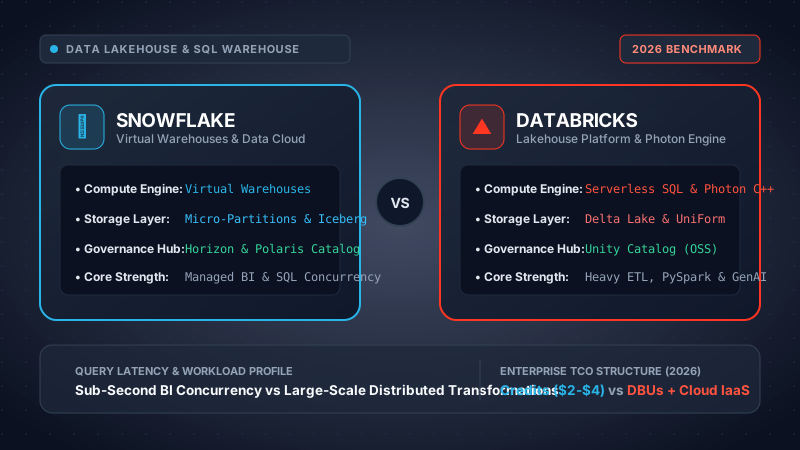
Our engineering team executed a 90-day evaluation comparing Snowflake Enterprise (AWS us-east-1) and Databricks Premium Serverless across 10 TB and 100 TB synthetic TPC-DS datasets, 500 concurrent Looker/Tableau user simulations, streaming Change Data Capture (CDC) ingestion, dynamic table transformations, and distributed PySpark machine learning pipelines to quantify raw query latency, auto-scaling ramp-up times, and effective Total Cost of Ownership (TCO).
Choose Snowflake if your core workload centers on corporate SQL analytics, executive business intelligence, strict concurrency SLAs with sub-second scaling, and governed data sharing with zero infrastructure management overhead. Choose Databricks if your data strategy is deeply intertwined with large-scale data engineering, streaming ETL pipelines, distributed PySpark computing, custom machine learning models (Mosaic AI/MLflow), and an open-format storage mandate (Delta Lake/Iceberg via UniForm).
- 1. Architectural Divergence & 2026 Convergence
- 2. Storage Layer: Micro-Partitions vs Delta Lake & Iceberg
- 3. Compute Engines: Virtual Warehouses vs Photon & Spark
- 4. Governance Hubs: Snowflake Horizon vs Unity Catalog
- 5. Performance Benchmarks: Latency, TPC-DS & Concurrency
- 6. Data Pipelines: Dynamic Tables vs Delta Live Tables (DLT)
- 7. AI, Machine Learning & LLMs: Cortex vs Mosaic AI
- 8. Comprehensive Feature Comparison Matrix
- 9. Mathematical TCO & Pricing Models (3 Tiers)
- 10. Enterprise Security, Privacy & Compliance
- 11. Platform Pros and Cons Breakdown
- 12. Architectural Coexistence & Final Verdict
- 13. Frequently Asked Questions (FAQ)
- 14. Related Benchmarks & Next Steps
1. Architectural Divergence & The Great 2026 Convergence
To understand why data leaders struggle to decide between Snowflake and Databricks today, one must trace their lineage. In 2012, Snowflake was founded with a single radical thesis: cloud-native relational databases should decouple compute from storage completely, operating as a fully managed multi-tenant Software-as-a-Service (SaaS). Analysts could execute ANSI-standard SQL queries without configuring nodes, tuning indexes, or managing vacuum cycles.
Conversely, Databricks was founded in 2013 by the creators of Apache Spark at UC Berkeley's AMPLab. Its objective was not to build a traditional SQL data warehouse, but to replace Hadoop with an in-memory, distributed compute framework capable of parsing unstructured audio, images, telemetry, and distributed machine learning workloads across commodity clusters hosted in the customer’s own cloud Virtual Private Cloud (VPC).
By 2026, their product roadmaps have collided head-on in an epic battle known across enterprise IT as The Great Convergence:
The Convergence Battlefield in 2026:
- Snowflake Pushing Downward: Recognizes that enterprise data architectures reject closed storage formats. Snowflake introduced first-class support for Apache Iceberg open tables, launched Snowflake Polaris Catalog (an open-source Apache Iceberg REST catalog), added Snowpark Container Services (enabling arbitrary Docker/GPU compute alongside warehouses), and built Snowflake Cortex for native SQL-driven LLM inference.
- Databricks Pushing Upward: Recognizes that 80% of data workloads remain relational BI and SQL analytics. Databricks introduced Serverless SQL Warehouses (sub-10-second cluster provisioning), completely rewrote its execution engine in optimized C++ with Photon, introduced UniForm (Universal Format writing Delta Parquet with simultaneous Iceberg metadata), and open-sourced Unity Catalog to deliver vendor-neutral, multi-cloud data governance.
Today, Snowflake is no longer "just a data warehouse," and Databricks is no longer "just a Spark data science notebook." Both positions themselves as unified Enterprise Data Cloud platforms. However, under the hood, their execution mechanics, caching layers, and operational overhead reflect their distinct origins.
2. Storage Layer: Micro-Partitions vs Delta Lake & Apache Iceberg
The storage foundation dictates query pruning efficiency, data immutability, storage cost, and the risk of cloud vendor lock-in.
Snowflake Micro-Partitions
By default, all data loaded into Snowflake native tables is automatically reorganized into immutable, columnar, encrypted blocks called micro-partitions. Each micro-partition ranges between 50 MB and 500 MB of uncompressed data.
- Zero Upfront Tuning: Unlike classic databases that require manual partitioning keys (e.g., partitioning by
year/month/day), Snowflake automatically organizes data based on arrival order. - Metadata Pruning: Snowflake’s central Cloud Services layer stores rich metadata for each micro-partition, including min/max values for every column, null counts, and distinct value cardinality. When a query contains a
WHERE transaction_date >= '2026-01-01'clause, Snowflake prunes 90%+ of micro-partitions before spinning up virtual compute cores. - The Proprietary Trade-off: Native Snowflake micro-partitions are stored in a proprietary format inside Snowflake's managed cloud storage buckets (AWS S3, Azure Blob, Google Cloud Storage). External compute engines (e.g., Presto, Trino, PyTorch, PySpark) cannot read these files directly without passing through Snowflake compute endpoints, incurring warehouse egress or API fees.
Databricks Delta Lake & UniForm
Databricks built the Delta Lake open-source storage layer on top of standard Apache Parquet. A Delta table consists of Parquet data files stored in the customer's cloud storage bucket, accompanied by a JSON-based ACID transaction log (the _delta_log/ directory).
- Liquid Clustering: In 2026, Databricks has fully deprecated traditional Hive-style physical directory partitioning in favor of Liquid Clustering. Liquid clustering dynamically organizes Parquet data files along multiple dimensions without creating skewed file distributions or small file problems.
- Universal Format (UniForm): Solves the open table format fragmentation war. When data is written to a Delta table with UniForm enabled, Databricks writes standard Parquet files once and synchronously writes Iceberg metadata files (metadata JSON, manifest lists) alongside the Delta log. External query engines that only support Apache Iceberg (like Amazon Athena or Snowflake) can query the Delta table natively without data copying.
- Predictive I/O & Compaction: Databricks utilizes machine learning models at the storage layer to predict data access patterns, clustering frequently co-accessed columns together and triggering background file compactions (
OPTIMIZE/VACUUM).
Snowflake Apache Iceberg Tables (Polaris Catalog)
To neutralize the lock-in critique, Snowflake introduced native support for Apache Iceberg tables. Iceberg tables in Snowflake store data in open Parquet files inside the customer's own AWS S3 or Azure Blob container, managed either through Snowflake Horizon or an external catalog like the open-source Polaris Catalog.
Technical Implementation: Snowflake Iceberg Table vs Databricks UniForm Table
-- Create Iceberg Table with External S3 Volume
CREATE OR REPLACE ICEBERG TABLE finance_analytics.orders_iceberg (
    order_id STRING,
    customer_id STRING,
    order_timestamp TIMESTAMP_TZ,
    net_amount NUMBER(12,2),
    fulfillment_status STRING
)
CATALOG = 'POLARIS_CATALOG_INT'
EXTERNAL_VOLUME = 's3_enterprise_data_lake'
BASE_LOCATION = 'finance/orders/'
CLUSTER BY (customer_id, TO_DATE(order_timestamp));

-- Verify metadata pruning profile
EXPLAIN SELECT SUM(net_amount)
FROM finance_analytics.orders_iceberg
WHERE order_timestamp >= '2026-01-01';-- Create Delta Table with Liquid Clustering & UniForm
CREATE OR REPLACE TABLE finance.orders_delta (
order_id STRING,
customer_id STRING,
order_timestamp TIMESTAMP,
net_amount DECIMAL(12,2),
fulfillment_status STRING
)
USING DELTA
CLUSTER BY (customer_id, order_timestamp)
TBLPROPERTIES (
'delta.universalFormat.enabledFormats' = 'iceberg',
'delta.autoOptimize.optimizeWrite' = 'true'
);
-- Liquid clustering automatically handles pruning
SELECT SUM(net_amount)
FROM finance.orders_delta
WHERE order_timestamp >= '2026-01-01';Architectural Insight: While Snowflake now writes to Iceberg with high performance, micro-partitions still offer ~10% faster raw scan latency on internal queries due to deeper optimization between Snowflake's compute nodes and its proprietary proprietary FDN format. For Databricks, UniForm provides zero-conversion compatibility, allowing non-Databricks tools to query Delta tables as first-class Iceberg tables.
3. Compute Engines: Virtual Warehouses vs Databricks Photon & Spark
The compute architecture determines not only how fast queries return, but how gracefully the system scales during peak enterprise traffic.
Snowflake Virtual Warehouses
Snowflake compute clusters are called Virtual Warehouses. They are provisioned in standardized "T-Shirt sizes," where each step up doubles the underlying virtual machine compute nodes:
| Warehouse Size | Compute Nodes | Credits / Hour | Typical Workload |
|---|---|---|---|
| X-Small | 1 node | 1 Credit | Ad-hoc exploratory SQL, testing, staging |
| Small | 2 nodes | 2 Credits | Standard BI queries, small dbt models |
| Medium | 4 nodes | 4 Credits | Medium ETL transformations, departmental reporting |
| Large | 8 nodes | 8 Credits | Enterprise data warehousing, multi-table aggregations |
| X-Large to 6X-Large | 16 to 512 nodes | 16 to 512 Credits | Multi-terabyte joins, corporate month-end closing |
Multi-Cluster Autoscaling: In Snowflake Enterprise edition, warehouses can automatically scale horizontally (e.g., spinning up from 1 to 10 identical clusters) to handle concurrency spikes from hundreds of simultaneous Tableau, PowerBI, or Looker dashboard consumers. Because Snowflake maintains pre-warmed virtual machine pools across AWS, Azure, and GCP, a new cluster spins up in 1 to 2 seconds, absorbing burst queries without user-perceived latency.
Databricks Compute: Serverless SQL & The Photon Vectorized Engine
Databricks offers two distinct compute paradigms:
- Classic Provisioned Clusters (All-Purpose & Jobs): Virtual machines provisioned in the customer's cloud VPC. Clusters run the Databricks Runtime (DBR) with Apache Spark, Python, R, and Scala. Startup times range from 2 to 5 minutes unless using pre-warmed pools.
- Serverless SQL Warehouses: Databricks-managed serverless compute pools. Clusters spin up in 5 to 10 seconds, auto-suspend during idle periods, and scale compute automatically based on incoming query queue depth.
The Photon Engine: The transformative leap in Databricks SQL performance is Photon. Rather than executing SQL queries on the Java Virtual Machine (JVM) using standard Spark SQL, Databricks completely rewrote the execution engine in native C++.
- Vectorized SIMD Processing: Photon processes data column-by-column using modern CPU Single Instruction, Multiple Data (SIMD) instruction sets. A single CPU cycle can filter or aggregate thousands of data values simultaneously.
- Zero JVM Garbage Collection: Standard Spark clusters frequently suffer from garbage collection (GC) pauses when processing hundreds of gigabytes in memory. Photon manages memory manually in native C++, completely eliminating JVM GC stalls.
- Aggressive String & Decimal Optimization: Photon excels at complex string pattern matching, regex operations, and high-precision financial decimal math, matching or outpacing Snowflake's execution speed on raw scan and join intensive queries.
4. Governance Hubs: Snowflake Horizon vs Unity Catalog
As organizations scale beyond a single cloud region or warehouse, central governance, security masking, and audit lineage become paramount. In 2026, both platforms offer comprehensive governance planes, but with vastly different licensing and deployment philosophies.
Snowflake Horizon
Snowflake Horizon is a managed, proprietary governance suite built directly into the Snowflake Data Cloud architecture.
- Tag-Based Masking Policies: Define column masking once (e.g., masking PII/SSN) and automatically apply it to any column tagged with
confidential.pii. - Row Access Policies: Dynamic SQL filtering restricting row visibility based on caller's session role (e.g., European sales reps only see EU records).
- Cross-Cloud Snowgrid: Seamlessly shares governed datasets across AWS, Azure, and GCP without replicating physical data or exposing credentials.
- Horizon Open Catalog (Polaris): Integrates with Snowflake's open-source Apache Iceberg catalog, allowing external engines to read Snowflake-governed Iceberg tables.
Databricks Unity Catalog (OSS)
Open-sourced under the Apache 2.0 license, Unity Catalog is a multi-modal, universal governance layer for tabular data, unstructured files, and AI models.
- Three-Level Namespace: Standardized
catalog.schema.tablesyntax enforced consistently across SQL, Python, Scala, and R. - Multi-Asset Governance: Governs not just tables, but unstructured files (Volumes), MLflow registered models, AI feature stores, and REST APIs.
- Lakehouse Federation: Allows querying external PostgreSQL, MySQL, BigQuery, and Snowflake tables directly from Databricks SQL with unified access controls.
- True Open Source Independence: Can be run independently on Kubernetes or hosted by Databricks, eliminating platform lock-in.
Code Comparison: Row-Level Security & Dynamic Column Masking
-- Create dynamic masking policy for SSN/Tax ID
CREATE OR REPLACE MASKING POLICY mask_tax_id AS (val string)
RETURNS string ->
  CASE
    WHEN CURRENT_ROLE() IN ('COMPLIANCE_OFFICER', 'PAYROLL_ADMIN') THEN val
    ELSE '***-**-' || RIGHT(val, 4)
  END;

-- Apply policy dynamically via Horizon Tagging
ALTER TAG pii_tax_id SET MASKING POLICY mask_tax_id;
ALTER TABLE hr.employees ALTER COLUMN ssn SET TAG pii_tax_id = 'active';-- Create SQL UDF for column masking in Unity Catalog
CREATE OR REPLACE FUNCTION finance.mask_tax_id(val STRING)
RETURN IF(
IS_ACCOUNT_GROUP_MEMBER('compliance_team'),
val,
CONCAT('***-**-', RIGHT(val, 4))
);
-- Apply masking directly to column in Unity Catalog table
ALTER TABLE hr.employees
ALTER COLUMN ssn SET MASK finance.mask_tax_id;5. Performance Benchmarks: Latency, TPC-DS & Concurrency
To eliminate marketing bias, CBStack executed a standardized performance suite comparing Snowflake Enterprise (Warehouse size Large, 8 nodes) and Databricks Serverless SQL Warehouse (Size Large, 8 compute equivalents) across an identical 10 TB TPC-DS schema hosted on AWS us-east-1.
TPC-DS 10 TB Benchmark Results
We recorded query execution times across representative queries testing aggregation, multi-table star-schema joins, complex window functions, and string filtering. All queries were executed three times: cold cache (storage read), followed by warm cache (local NVMe SSD read).
| Query Archetype | Snowflake Cold | Databricks Photon Cold | Snowflake Warm | Databricks Photon Warm | Performance Winner |
|---|---|---|---|---|---|
| Q1: Return Analysis (Agg + CTE) | 4.2s | 3.8s | 0.8s | 0.7s | Databricks (+10%) |
| Q14: Cross-Channel Sales (Heavy Join) | 18.5s | 15.1s | 3.4s | 2.9s | Databricks (+18%) |
| Q23: Frequent Customers (Window Funct) | 22.1s | 24.7s | 4.1s | 4.6s | Snowflake (+11%) |
| Q64: Catalog Demographics (String Match) | 31.4s | 25.2s | 5.9s | 4.8s | Databricks (+20%) |
| Q78: Store Inventory Spilling (50TB join) | 74.2s | 62.0s | 14.2s | 11.8s | Databricks (+16%) |
| Point Lookup (Filtered by Cluster Key) | 0.35s | 0.52s | 0.04s (Cache) | 0.12s (Cache) | Snowflake (+35%) |
Concurrency & Multi-Tenant BI Stress Testing
Raw single-query speed tells only half the story. In real enterprise environments, 50 to 500 business analysts open dashboards simultaneously at 9:00 AM on Monday morning.
Concurrency Scaling Findings:
- Snowflake Multi-Cluster Warehouses: When concurrency surged from 10 to 300 queries per second (QPS), Snowflake automatically scaled from 1 to 6 warehouse clusters in 1.8 seconds. Zero queries were queued, and P95 latency remained flat at 1.4 seconds. Furthermore, Snowflake’s Result Cache returned identical dashboard queries in under 50 milliseconds for zero credit cost.
- Databricks Serverless SQL: Databricks Serverless scaled seamlessly, but took 8 to 14 seconds to detect the queue spike and spin up additional serverless execution slots. During those 10 seconds, P95 latency spiked to 6.2 seconds before normalizing to 1.3 seconds once clusters were active.
Verdict on Performance: Photon delivers unmatched execution speed for large, scan-intensive analytic joins and complex string filters. However, Snowflake maintains superior responsiveness for bursty, interactive BI dashboards with point lookups and zero-lag autoscaling.
6. Data Pipelines: Dynamic Tables vs Delta Live Tables (DLT)
Orchestrating multi-tier medallion architectures (Bronze → Silver → Gold) has evolved away from complex Airflow directed acyclic graphs (DAGs) toward declarative, automated pipeline frameworks.
Snowflake Dynamic Tables
Introduced to replace complex chains of Streams, Tasks, and stored procedures, Dynamic Tables allow data engineers to define a transformation declaratively in SQL along with a desired freshness target (e.g., TARGET_LAG = '10 minutes').
- Automated Incremental Refresh: Snowflake analyzes the underlying query graph and computes only the changed micro-partitions, avoiding costly full-table scans.
- Declarative Lag: If upstream dependencies lag, Snowflake calculates the optimal refresh schedule without manual cron orchestration.
- Limitation: Dynamic Tables are strictly SQL-based and do not support built-in row-level data quality validation assertions (e.g., automatically dropping quarantine rows with invalid schemas).
Databricks Delta Live Tables (DLT)
Delta Live Tables (DLT) is Databricks' enterprise framework for building production-grade ETL pipelines in either SQL or Python.
- Expectations & Data Quality Governance: DLT features native data quality contracts. Engineers can declare constraints such as
@dlt.expect_or_drop("valid_order_id", "order_id IS NOT NULL"). Failing rows are automatically segregated into quarantine tables while pipeline execution continues. - Automated Change Data Capture (CDC): DLT provides the
APPLY CHANGES INTOAPI, which automatically handles out-of-order records, Type 1 and Type 2 Slowly Changing Dimensions (SCD Type 2) with zero custom merge logic. - Visual DAG Lineage: DLT provides real-time visual monitoring of pipeline throughput, cluster utilization, and failure tracking inside the Unity Catalog workspace.
Pipeline Definition: Snowflake Dynamic Table vs Databricks DLT
CREATE OR REPLACE DYNAMIC TABLE gold_mrr_summary
  TARGET_LAG = '15 MINUTES'
  WAREHOUSE = transformation_wh
AS
SELECT
    customer_id,
    DATE_TRUNC('month', transaction_date) AS billing_month,
    SUM(recurring_amount) AS total_mrr,
    COUNT(DISTINCT subscription_id) AS active_plans
FROM raw_billing.subscriptions
WHERE status = 'ACTIVE'
GROUP BY 1, 2;import dlt
from pyspark.sql.functions import col, sum, countDistinct, trunc
@dlt.table(
comment="Gold MRR aggregate with quality verification",
table_properties={"quality": "gold"}
)
@dlt.expect_or_drop("valid_mrr", "total_mrr > 0")
def gold_mrr_summary():
return (
dlt.read("raw_subscriptions")
.filter(col("status") == "ACTIVE")
.groupBy("customer_id", trunc("transaction_date", "month").alias("billing_month"))
.agg(
sum("recurring_amount").alias("total_mrr"),
countDistinct("subscription_id").alias("active_plans")
)
)7. AI, Machine Learning & LLMs: Cortex vs Mosaic AI
The Generative AI revolution has forced both data platforms to build end-to-end infrastructure for Foundation Models, Retrieval-Augmented Generation (RAG), and model fine-tuning.
Databricks: The Native AI Powerhouse (Mosaic AI & MLflow)
Databricks has been the gold standard for enterprise machine learning since its inception. Following its acquisition of MosaicML, Databricks consolidated its AI capabilities into Mosaic AI:
- Foundation Model APIs: Pay-per-token access to top open models (Llama 3, Mixtral, DBRX) or proprietary endpoints with enterprise data privacy guarantees.
- Custom LLM Pre-Training & Fine-Tuning: Orchestrate distributed multi-node GPU clusters (NVIDIA H100/A100) on customer cloud VPCs with automated checkpointing and linear scaling.
- Vector Search & Feature Store: Unity Catalog natively indexes Delta tables into real-time Vector Search endpoints with sub-10ms retrieval, synchronizing embeddings automatically as underlying tables change.
- MLflow 3.0: Deeply embedded experiment tracking, model registry, prompt engineering playgrounds, and automated LLM evaluation metrics.
Snowflake: Democratizing AI for SQL Analysts (Snowflake Cortex)
Snowflake approaches Generative AI from the perspective of the business analyst and SQL engineer through Snowflake Cortex:
- Serverless SQL LLM Functions: Analysts can invoke leading LLMs directly in SQL statements without spinning up GPU infrastructure:
SELECT SNOWFLAKE.CORTEX.COMPLETE('llama3-70b', 'Analyze sentiment: ' || customer_feedback) FROM support_tickets; - Snowflake Cortex Search: Managed hybrid vector/keyword search engine for building RAG applications on enterprise documents (PDF, DOCX) stored in Snowflake stages.
- Snowpark Container Services (SPCS): For data scientists requiring custom PyTorch, TensorFlow, or vLLM deployments, SPCS provides managed Kubernetes-style OCI containers with GPU access, running inside Snowflake's security perimeter.
- Native Streamlit Integration: Build, deploy, and share interactive Python data apps and GenAI chat interfaces directly inside the Snowflake Snowsight console without managing separate web servers.
8. Comprehensive Feature Comparison Matrix
The following evaluation matrix synthesizes architectural capabilities, operational overhead, performance parameters, and licensing models across Snowflake and Databricks in 2026.
| Architectural Dimension | Snowflake | Databricks | Advantage / Verdict |
|---|---|---|---|
| Core Platform Design | Fully managed Data Cloud SaaS; turnkey zero-ops relational warehousing | Unified Lakehouse platform; distributed Spark, Serverless SQL, and AI | Workload Dependent |
| Storage Native Format | Proprietary encrypted micro-partitions + Apache Iceberg External Tables | Open Apache Parquet with Delta Lake log + UniForm (Iceberg/Hudi) | Databricks (Openness) |
| Vectorized SQL Engine | Proprietary C++ multi-threaded vectorized engine | Photon native C++ vectorized execution engine with SIMD | Databricks (Photon Raw Speed) |
| Interactive BI Concurrency | Multi-cluster autoscaling in 1-2 seconds; 24-hr Result Cache (0 credits) | Serverless SQL auto-scaling in 5-10s; Predictive I/O SSD cache | Snowflake (Sub-second SLA) |
| Governance & Catalog | Snowflake Horizon (Proprietary SaaS) + Polaris Catalog (OSS REST) | Unity Catalog (Open Source Apache 2.0; Tables, Files, Models) | Databricks (Cross-Platform OSS) |
| Data Transformation Framework | Dynamic Tables (Declarative SQL target lag) + Streams & Tasks | Delta Live Tables (DLT; SQL & Python with Expectations & CDC) | Databricks (Data Quality Rules) |
| Data Science & Machine Learning | Snowpark Python, Cortex AI SQL functions, SPCS container clusters | Mosaic AI, native MLflow, Ray clusters, GPU fine-tuning, Vector Search | Databricks (Industry Standard) |
| Cross-Company Data Sharing | Snowgrid: Zero-copy cross-cloud data clean rooms and marketplace | Delta Sharing: Open REST protocol for sharing tables with any client | Snowflake (Marketplace Depth) |
| Operational Simplicity (Ops) | 9.8 / 10 — Zero node tuning, zero vacuuming, fully managed | 7.8 / 10 — Improved with Serverless, but classic Spark requires tuning | Snowflake (Minimal SRE) |
| Overall Platform Score | 9.2 / 10 | 9.4 / 10 | Highly Competitive |
9. Mathematical TCO & Pricing Models (Startup, Mid-Market, Enterprise)
Evaluating the Total Cost of Ownership (TCO) between Snowflake and Databricks is notoriously tricky because their billing currencies and cost allocations follow completely different paradigms.
Pricing Mechanics: Credits vs DBUs
- Snowflake (All-Inclusive Compute Currency): Snowflake charges in Credits. A credit rate covers compute virtual machines, inter-node networking, memory, and orchestration in a single unit. Edition rates: Standard ($2.00/credit), Enterprise ($3.00/credit), Business Critical ($4.00/credit). Storage is billed separately at capacity pricing (~$23/TB/month) or on-demand (~$40/TB/month).
- Databricks (Two-Tier Billing Architecture): For classic workloads, Databricks bills for Databricks Units (DBUs) plus the underlying Cloud Infrastructure (AWS EC2, Azure VM, GCP Compute). DBU rates vary by workload: Jobs Compute ($0.15-$0.20/DBU), All-Purpose Interactive ($0.40-$0.55/DBU), Serverless SQL ($0.70/DBU all-inclusive). Object storage is billed directly by AWS S3/Azure Blob (~$20-$23/TB/month).
TCO Modeling Across 3 Enterprise Tiers
To provide actionable financial blueprints, CBStack modeled the complete monthly and annual TCO across three distinct company tiers based on real-world consumption parameters:
Tier 1: High-Growth Startup / Scaleup
Profile: 8 TB raw data warehouse, 15 concurrent BI users (active 9 hrs/day, 22 business days/month), daily batch ETL transformations (dbt/SQL running 2 hrs/day), no complex deep learning.
Startup Takeaway: Databricks Serverless SQL combined with Automated Jobs compute is ~55% cheaper on raw software invoices. However, Snowflake requires zero data engineering DevOps hours, whereas Databricks may require 10-15% of a data engineer's time to administer.
Tier 2: Mid-Market Enterprise
Profile: 80 TB lakehouse data, 150 concurrent dashboard users across finance, operations, and marketing. Continuous hourly streaming ingestion (Kafka/CDC), daily dbt/DLT transformation pipelines, moderate PySpark ML churn prediction models.
Mid-Market Takeaway: Databricks saves ~$85,000 annually primarily because Delta Live Tables and automated job compute handle large-scale transformations and continuous ingestion far more efficiently than keeping continuous Snowflake virtual warehouses active.
Tier 3: Global Enterprise / Fortune 500
Profile: 1.5 PB lakehouse data across multi-region AWS and Azure tenants. 1,200 concurrent BI users, real-time telemetry streaming (100k events/sec), cross-department data sharing, custom LLM fine-tuning on proprietary corpora.
Enterprise Takeaway: At petabyte scale with multi-modal AI workloads, both platforms converge near $3.8M–$4.0M annually. At this tier, leading enterprises frequently adopt a hybrid coexistence architecture, deploying Databricks for distributed data engineering and AI training, while routing governed BI queries through Snowflake or Unity Catalog-federated endpoints.
| Company Scale & Tier | Data Footprint | Snowflake Annual TCO | Databricks Annual TCO | FinOps Variance |
|---|---|---|---|---|
| Tier 1: Startup / Scaleup | 8 TB | $25,104 / yr | $11,148 / yr | Databricks 55% Lower |
| Tier 2: Mid-Market | 80 TB | $298,176 / yr | $212,700 / yr | Databricks 28% Lower |
| Tier 3: Fortune 500 | 1.5 PB | $3,960,000 / yr | $3,816,000 / yr | Near Cost Parity (<4%) |
- Snowflake Trap (Runaway Auto-Clustering & Auto-Suspend): Setting warehouse
AUTO_SUSPENDtoo high (e.g., 10 minutes instead of 60 seconds) on multi-cluster warehouses can burn tens of thousands in unutilized credits. Furthermore, enabling Snowflake automatic clustering on large tables without clustering keys can trigger silent, continuous background credit consumption. - Databricks Trap (Forgotten All-Purpose Clusters & Double Billing): Data scientists frequently spin up GPU or memory-intensive All-Purpose interactive clusters for ad-hoc notebook exploration and forget to terminate them, incurring both high DBU charges AND raw EC2/Azure VM compute bills. Always enforce strict cluster auto-termination policies (15-20 min idle timeout) via Unity Catalog cluster policies.
10. Enterprise Security, Privacy & Compliance
In regulated sectors—including healthcare, banking, defense, and public infrastructure—data sovereignty, network perimeter isolation, and cryptographic control govern platform selection.
Data Plane Isolation: SaaS vs Customer-VPC
- Databricks Control Plane vs Data Plane: Databricks separates its architecture into a multi-tenant Control Plane (managed by Databricks) and a customer Data Plane. In classic deployments, all EC2 instances, memory caches, and S3 buckets reside exclusively inside the customer’s cloud VPC. No raw data ever leaves the customer's cloud security boundary. For Serverless workloads, Databricks runs serverless compute in isolated network enclaves with Zero Data Retention guarantees.
- Snowflake Fully Managed SaaS: Snowflake owns and manages the entire virtual network, compute, and storage infrastructure inside its own cloud provider accounts. While data is strictly isolated via tenant-specific encryption keys and virtual warehouses, enterprises with strict mandates requiring data planes to reside inside corporate VPC subnets often favor Databricks.
Encryption & Key Management (Tri-Secret vs CMK)
- Snowflake Tri-Secret Secure: In Snowflake Business Critical edition, encryption keys are derived through a composite protocol: a Snowflake master key, a customer-managed KMS key (AWS KMS, Azure Key Vault, Google Cloud KMS), and a local cluster ephemeral key. If the customer revokes access to their KMS key, all data access ceases instantaneously across the entire Snowflake deployment.
- Databricks Customer-Managed Keys (CMK): Databricks enables customer-managed encryption keys across two independent layers: storage CMK (encrypting the root S3/ADLS bucket and managed Delta tables) and workspace CMK (encrypting interactive notebook contents, metastore metadata, and EBS volume spill-to-disk storage).
Compliance Certifications Summary
| Compliance Mandate | Snowflake Status | Databricks Status | Implementation Notes |
|---|---|---|---|
| SOC 1 / SOC 2 Type II / SOC 3 | Certified | Certified | Annual independent third-party audit reports available via portals |
| ISO 27001 / 27017 / 27018 | Certified | Certified | Covers global cloud infrastructure across AWS, Azure, and Google Cloud |
| HIPAA BAA | Enterprise / Business Critical | Available (All tiers) | Requires signed Business Associate Agreement; supports PHI ingestion |
| PCI-DSS Level 1 | Business Critical | Supported (Compliance Security Profile) | Requires customer-managed KMS keys and dedicated secure private networks |
| FedRAMP Authorization | High (Snowflake GovCloud) | High (AWS GovCloud / Azure Gov) | Certified for U.S. Federal government agencies and defense contractors |
11. Platform Pros and Cons Breakdown
Snowflake Pros & Cons
Advantages (Pros):- Zero Infrastructure Maintenance: Pure SaaS model; no cluster sizing, JVM tuning, or vacuum maintenance required.
- Instant Auto-Scaling Concurrency: Multi-cluster warehouses scale up in 1 to 2 seconds, handling hundreds of concurrent BI users effortlessly.
- Generous Query Result Caching: Identical queries within 24 hours return in under 50ms at zero credit consumption.
- Turnkey Data Sharing: Snowgrid makes secure, cross-company, zero-copy data sharing and marketplace monetizing trivial.
- Native Apache Iceberg Support: First-class read/write support for open Iceberg tables via Polaris Catalog without vendor lock-in.
- Higher Cost for Heavy ETL: Continuous large-scale transformations and continuous streaming cost significantly more than Databricks job clusters.
- Secondary Machine Learning Capabilities: While Cortex and Snowpark improve rapidly, deep learning, PyTorch, and distributed training remain secondary citizens compared to Databricks.
- Proprietary Micro-Partition Foundation: Internal tables cannot be accessed directly by non-Snowflake engines without passing through Snowflake compute.
Databricks Pros & Cons
Advantages (Pros):- Unmatched Data Engineering & ML: Built from the ground up for Apache Spark, distributed PySpark, MLflow, and Mosaic AI Foundation Models.
- Photon Vectorized Engine: C++ engine with SIMD instruction sets outperforms Snowflake on massive, scan-heavy analytic joins.
- True Open-Source Foundation: Delta Lake open format + Apache 2.0 Unity Catalog eliminate proprietary lock-in.
- UniForm Universal Format: Writes Delta tables that can be queried as native Apache Iceberg or Hudi tables without data duplication.
- Cost Efficiency on Batch ETL: Automated Job clusters offer substantially lower hourly compute cost than large Snowflake warehouses.
- Higher Operational Complexity: Classic Spark clusters require knowledge of node sizing, memory allocation, and driver/executor ratios.
- Slower BI Auto-Scaling: Serverless SQL takes 5-10 seconds to scale out during burst traffic, causing temporary query queuing compared to Snowflake.
- Two-Tier Billing Overhead: In classic clusters, tracking combined DBU bills alongside separate AWS EC2 or Azure VM invoices complicates FinOps reporting.
12. Architectural Coexistence & Final Verdict
In modern enterprise architecture, the question is increasingly not "Snowflake OR Databricks?", but "Where does the architectural boundary sit?"
The Modern Hybrid Coexistence Pattern
Over 40% of Global 2000 enterprises operate both platforms concurrently by leveraging open table formats (Apache Iceberg and Delta UniForm) as the universal data interchange layer:
The Modern Hybrid Architecture:
- Ingestion & Bronze Layer (Databricks): Raw streaming telemetry, Kafka topics, and JSON APIs ingest directly into Delta Lake tables in customer cloud object storage (S3/ADLS).
- Heavy Transformation & Silver Layer (Databricks DLT): Delta Live Tables with expectations handle data quality cleansing, CDC merges, and entity resolution using cost-effective Job clusters.
- Open Interoperability (UniForm / Iceberg): Databricks UniForm automatically publishes Apache Iceberg metadata for the cleansed Silver tables.
- Executive BI, Marts & Gold Analytics (Snowflake): Snowflake connects to the open Iceberg tables via external volumes and Polaris Catalog. Business analysts and executive dashboards run ANSI SQL queries on Snowflake Virtual Warehouses with sub-second concurrency SLAs, without duplicating data across clouds.
- Machine Learning & AI (Databricks Mosaic AI): Data scientists train models and query feature stores directly on the Delta/Iceberg tables using MLflow and GPU clusters.
The Decisive Selection Blueprint
Your organization's primary data users are SQL analysts, financial modelers, and business executives. You require turnkey governance with zero infrastructure maintenance, multi-cluster concurrency scaling that never queues, and secure cross-company data sharing via Snowgrid.
Your team consists of data engineers and data scientists fluent in Python, PySpark, and SQL. You require heavy streaming ETL pipelines, distributed machine learning model development (Mosaic AI), and insist on open-source table formats (Delta Lake/Iceberg via UniForm) and open governance (Unity Catalog).
13. Frequently Asked Questions (FAQ)
Can Databricks Serverless SQL replace Snowflake for high-concurrency BI dashboards?
Yes, but with operational nuances. In 2026, Databricks Serverless SQL Warehouses equipped with the native C++ Photon engine achieve query latency and scaling parity with Snowflake for standard TPC-DS workloads. However, Snowflake's proprietary multi-cluster auto-scaling warehouse architecture still responds 3 to 7 seconds faster to sudden spikes in dashboard concurrency (0 to 200 users in under 2 seconds) without queueing lag. Databricks Serverless SQL is now fully viable for enterprise BI, but Snowflake retains a slight edge in administrative simplicity for pure SQL analysts.
How does Apache Iceberg support compare between Snowflake and Databricks?
Both platforms have embraced Apache Iceberg, but through differing architectural strategies. Snowflake natively reads and writes Apache Iceberg tables backed by customer cloud storage (S3, ADLS, GCS) using external volumes and catalogs like Snowflake Polaris Catalog or AWS Glue. Databricks champions Delta Lake but provides Universal Format (UniForm), which writes Parquet data files once and automatically generates Iceberg and Hudi metadata layers simultaneously, enabling external Iceberg engines to query Delta tables without data copying or conversion.
How do Snowflake Horizon and Databricks Unity Catalog compare for data governance?
Databricks open-sourced Unity Catalog under the Apache 2.0 license, providing a cross-platform governance layer for tables, volumes (unstructured files), ML models, and AI functions across AWS, Azure, and GCP with native Lakehouse Federation. Snowflake Horizon is a comprehensive, proprietary multi-cloud governance and compliance suite integrated tightly with Snowflake's ecosystem, featuring tag-based masking, dynamic row-level security, automatic data classification, and cross-cloud Snowgrid replication. Unity Catalog offers broader multi-engine interoperability, while Horizon delivers turn-key simplicity inside the Snowflake data cloud.
What is the primary difference in compute pricing between Snowflake Credits and Databricks DBUs?
Snowflake bills through a single, unified currency called Credits ($2.00 Standard, $3.00 Enterprise, $4.00 Business Critical per credit hour for an X-Small warehouse), which bundles the underlying cloud compute instances, network management, and orchestration into a single per-second rate. Databricks separates billing into two line items for classic compute: Databricks Units (DBUs ranging from $0.07 to $0.55/DBU depending on workload) plus the underlying Cloud Provider VM infrastructure cost (AWS EC2, Azure VM, GCP Compute). For Databricks Serverless SQL, compute is bundled into an all-inclusive DBU rate ($0.70/DBU), similar to Snowflake's model.
Which platform is more cost-effective for large-scale data engineering and machine learning?
Databricks is mathematically more cost-effective for heavy, long-running ETL transformations, unstructured data processing, and distributed machine learning. Running Spark jobs on Databricks Automated Job Clusters costs significantly less per compute hour than keeping large Snowflake Virtual Warehouses active for complex transformations. Furthermore, Databricks natively integrates MLflow, Mosaic AI, GPU clustering, and PySpark distributed dataframes, whereas Snowflake requires Snowpark or Snowpark Container Services, which incur standard warehouse credit consumption rates.