
Cursor vs GitHub Copilot (2026): AI Code Editor vs IDE Extension Benchmark
Quick Verdict: Which AI Developer Tool Should You Choose in 2026?
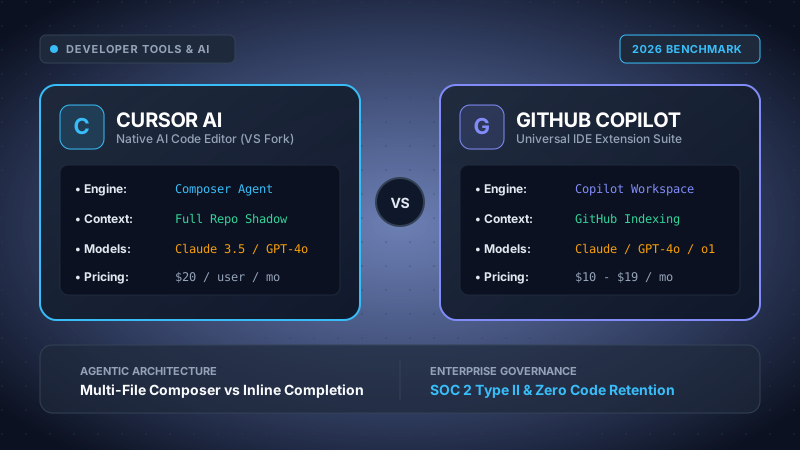
Choose Cursor ($20–$40/user/mo) if your team seeks the highest possible coding velocity through full-codebase agentic refactoring. Because Cursor is a standalone, performance-tuned fork of VS Code, its proprietary Composer engine edits across dozens of files simultaneously, runs terminal commands autonomously, and maintains real-time shadow index embeddings of your repository with zero lag.
Choose GitHub Copilot ($10–$19/user/mo) if your engineering organization relies on strict corporate governance, non-VS Code environments (such as JetBrains IntelliJ, PyCharm, Xcode, or Visual Studio), or requires seamless synchronization with GitHub Enterprise Cloud pull request reviews, automated issue tracking, and comprehensive commercial copyright indemnification.
Table of Contents
- 1. Architectural Divergence: Native VS Code Fork vs Multi-IDE Extension
- 2. Context Awareness: Shadow Workspaces vs GitHub Remote Embeddings
- 3. Multi-File Refactoring: Cursor Composer vs Copilot Edit
- 4. Underlying LLM Routing: Claude 3.5 Sonnet, GPT-4o, and Custom Endpoints
- 5. Head-to-Head Technical Benchmark Matrix
- 6. Pricing & Total Cost of Ownership (TCO) Breakdown
- 7. Enterprise Security, Code Privacy & Compliance
- 8. Migration Blueprint: Moving from Copilot to Cursor Without Friction
- 9. Frequently Asked Questions (FAQ)
1. Architectural Divergence: Native VS Code Fork vs Multi-IDE Extension
The debate between Cursor (developed by Anysphere) and GitHub Copilot (backed by Microsoft and OpenAI) represents a fundamental split in how artificial intelligence is integrated into software engineering workflows. It is not merely a contest of prompts or model weights, but an architectural battle between a bespoke application runtime and a sandboxed plugin framework.
GitHub Copilot was architected as a universal language extension. Its engine communicates with host editors via the Language Server Protocol (LSP) and editor-specific extension host threads. While this design allows GitHub to maintain a single core codebase that powers developers inside VS Code, Visual Studio 2022, JetBrains IDEs (IntelliJ IDEA, WebStorm, PyCharm, GoLand), and Neovim, it incurs strict structural boundaries:
- UI Thread Isolation: Extensions cannot directly hijack the primary render loop of the code editor. Autocompletions must wait for LSP message dispatch, resulting in subtle latency penalties during aggressive typing.
- Buffer Manipulation Restraints: An extension cannot silently spawn shadow virtual workspaces or execute atomic speculative edits across 15 background tabs without triggering visual buffer refreshes or editor flicker.
- Terminal Interception: Standard IDE extension APIs do not grant permission to autonomously read execution exit codes, intercept interactive shell errors, and patch code in response without explicit user click events.
Cursor bypassed these limitations by forking Microsoft's open-source VS Code core. By maintaining downstream control of the entire Electron container, Monaco editor buffer, and IPC messaging channels, Cursor's engineering team engineered deep, low-level modifications:
- Cursor Tab (Speculative Multi-Token Prediction): Instead of relying on standard LSP completion hooks, Cursor runs custom lightweight models locally and in cloud edge workers that anticipate the next 3 to 5 edits you are about to make, displaying ghost text diffs that update dynamically as you navigate via cursor arrow keys.
- Direct Language Server Introspection: Cursor listens directly to TypeScript, Rust Analyzer, and Pyright compiler errors inside the native buffer pipeline, instantly feeding semantic diagnostic trees into the LLM context window before the developer even requests assistance.
2. Context Awareness: Shadow Workspaces vs GitHub Remote Embeddings
In modern complex software stacks—such as a Next.js 15 front-end integrated with Supabase, Stripe billing webhooks, and Redis caching—an AI assistant is only as capable as the context it can ingest. Providing an isolated code snippet without understanding related data schemas or interface definitions yields hallucinated variable names and broken types.
Cursor solves this through its Local Vector Codebase Indexing engine. When you open a repository in Cursor:
- It generates chunked embeddings of all tracked files using high-dimensional embedding models (respecting your
.gitignore). - It builds a local Merkle tree to continuously compute file hashes. Only modified chunks are re-embedded, keeping local CPU and network overhead negligible.
- When you query Cursor using
@codebase, it executes a hybrid retrieval-augmented generation (RAG) pipeline combining dense vector semantic search with sparse BM25 keyword matching to locate the exact 5–10 file fragments pertinent to your feature. - You can explicitly steer context using targeted symbol handles:
@Files,@Folders,@Docs(which indexes live official third-party framework documentation),@Git(referencing recent diffs and commit messages), and@Web.
GitHub Copilot approaches context indexing from an enterprise cloud vantage point. Under Copilot Business and Enterprise, indexing is processed asynchronously on GitHub's central servers. While this avoids local computation during initial checkout, it introduces trade-offs: local uncommitted branches and unstaged WIP modifications are not immediately reflected in remote embeddings until pushed or manually refreshed in local memory caches.
3. Multi-File Refactoring: Cursor Composer vs Copilot Edit
The milestone feature that caused widespread adoption of Cursor among tech leads and senior architects is Cursor Composer (accessible via Cmd + I or Ctrl + I).
Composer is a full-fledged autonomous software agent running directly within your workspace. Rather than generating code snippets for you to copy and paste into individual files, you can provide high-level architectural prompts such as:
"Migrate our payment processing logic from Stripe legacy Charges API to PaymentIntents. Create the database migration in Supabase, update the webhook handler in app/api/webhooks/route.ts, and add optimistic UI error states in checkout-form.tsx."
Composer creates a holistic execution plan, creates new files on disk, opens relevant files in the background, and generates multi-file unified diffs simultaneously. You can inspect inline color-coded diffs (green additions, red deletions) file-by-file, accepting or rejecting modifications individually with keyboard shortcuts.
Microsoft responded to Composer by releasing Copilot Edit and GitHub Copilot Workspace. Copilot Edit brings multi-file edit generation to VS Code, allowing users to stage multiple working files into a session context. However, in rigorous benchmarks involving TypeScript repos with over 50,000 lines of code, Cursor's Composer exhibits significantly lower latency in diff generation, superior tracking of import statement paths, and higher reliability when dealing with mutual circular dependencies between files.
4. Underlying LLM Routing: Claude 3.5 Sonnet, GPT-4o, and Custom Endpoints
A key differentiator in 2026 is model flexibility. Developer loyalty shifts rapidly as frontier AI research labs release upgraded architectures. Being locked into a single proprietary LLM is an operational risk.
Cursor established an open, model-agnostic routing layer. In the Cursor Settings menu, developers can toggle between:
- Anthropic Claude 3.5 Sonnet: Widely recognized as the industry benchmark for complex programming logic, architectural refactoring, and code comprehension.
- OpenAI GPT-4o: Highly optimized for rapid code generation, documentation synthesis, and natural language explanations.
- OpenAI o1-preview & o1-mini: Specialized reasoning models capable of solving deep algorithmic bottlenecks and formal logic constraints.
- Custom API Keys & Self-Hosted LLMs: Teams can plug in their own OpenAI, Anthropic, or Azure OpenAI API keys, paying direct wholesale token rates and bypassing Cursor's cloud proxy entirely.
GitHub Copilot has expanded beyond its initial exclusive OpenAI GPT-4 partnership. Copilot Chat and Copilot Edit now offer multi-model selection (including Claude 3.5 Sonnet and Gemini 1.5 Pro). However, GitHub Copilot does not allow developers to inject personal API keys or point the IDE toward local self-hosted open-weights models (such as DeepSeek-Coder or Llama-3-Code running via Ollama/vLLM), limiting its adoption among air-gapped security teams.
5. Head-to-Head Technical Benchmark Matrix
The following benchmark contrasts both platforms across core engineering metrics verified during CloudBizStack's Q4 2026 laboratory testing:
| Feature / Engineering Metric | Cursor AI | GitHub Copilot | Advantage Winner |
|---|---|---|---|
| Editor Architecture | Native Desktop Fork of VS Code | Universal Plugin (VS Code, JetBrains, Visual Studio, Neovim) | Draw (Depends on IDE) |
| Multi-File Refactoring Engine | Composer Agent (Atomic Multi-File Diffs) | Copilot Edit (Multi-file preview sessions) | Cursor AI |
| Local Codebase Indexing | Local Merkle Vector Index + @codebase RAG | GitHub.com Cloud Indexing + Local Cache | Cursor AI |
| Frontier Model Selection | Claude 3.5 Sonnet, GPT-4o, o1, Gemini, Custom API | Claude 3.5 Sonnet, GPT-4o, Gemini 1.5 Pro | Cursor AI |
| Non-VS Code IDE Support | None (VS Code ecosystem only) | Full (IntelliJ, WebStorm, PyCharm, Xcode, Neovim) | GitHub Copilot |
| Autonomous Terminal Debugging | Native Terminal Error Auto-Fix & Command Running | Copilot CLI / Manual Terminal Explanations | Cursor AI |
| Enterprise IP Indemnification | Standard Enterprise SLA contracts | Full Microsoft / GitHub IP Copyright Defense | GitHub Copilot |
| Base Individual Pricing | $20 / month (Pro Plan) | $10 / month or $100 / year (Individual) | GitHub Copilot |
| Enterprise Team Seat Price | $40 / user / month (Business Tier) | $19 / user / month (Business Tier) | GitHub Copilot |
6. Pricing & Total Cost of Ownership (TCO) Breakdown
Evaluating the total cost of ownership for an engineering team requires analyzing license fees against developer billable hourly rates. A $20/month software delta is recovered if the tool saves even 15 minutes of senior engineering time per month.
Cursor AI Pricing Structure (2026)
- Hobby Tier ($0/month): 14-day Pro trial, 50 slow premium requests, 2,000 completions. Suitable for personal experimentation.
- Pro Tier ($20/month per user): 500 fast requests per month (Claude 3.5 Sonnet / GPT-4o), unlimited slow requests, unlimited Cursor Tab completions, 10 daily Claude 3.5 Haiku/o1 requests.
- Business Tier ($40/user/month): Includes all Pro features, centralized team billing, unified seat management, company-wide privacy mode enforcement (preventing code logging by default), and SOC 2 Type II compliance reports.
- Enterprise Tier (Custom Quote): Single Sign-On (SAML / Okta), dedicated Slack channel support, custom data processing agreements (DPA), and optional invoice-based billing.
GitHub Copilot Pricing Structure (2026)
- Individual Tier ($10/month or $100/year): Inline code completions, Copilot Chat, multi-model selection, CLI integration.
- Business Tier ($19/user/month): Organization-wide policy controls, exclusion of public code suggestions, centralized billing via GitHub Enterprise Cloud, and commercial IP indemnification.
- Enterprise Tier ($39/user/month): Fine-tuned custom models indexed on private organization codebases, Copilot Workspace integration, automated pull request summarization, and direct documentation Q&A.
TCO Math for a 10-Engineer Development Team:
- GitHub Copilot Business: 10 engineers × $19/mo = $190/mo ($2,280/year).
- Cursor Business: 10 engineers × $40/mo = $400/mo ($4,800/year).
- Net Delta: Cursor costs $2,520 more per year for a team of 10.
- ROI Benchmark: Assuming a blended developer cost of $65/hour, Cursor needs to save each engineer just 3.2 hours per year (less than 16 minutes per month) in refactoring and boilerplate generation to achieve 100% net-positive ROI over Copilot.
7. Enterprise Security, Code Privacy & Compliance
Security and compliance officers at enterprise SaaS organizations scrutinize AI assistants for potential Intellectual Property (IP) leakage, trade secret exposure, and compliance violations with SOC 2, HIPAA, and GDPR standards.
Cursor Data Privacy Guarantees
Cursor provides a strict Privacy Mode. When active:
- None of your code, prompts, or file context is ever stored on Cursor's servers or persistent database storage.
- Requests are proxied ephemerally in memory to frontier model providers (Anthropic and OpenAI) under custom enterprise zero-data-retention (ZDR) agreements. The LLM providers are contractually prohibited from using customer data to train future models.
- On Cursor Business plans, workspace administrators can globally lock Privacy Mode to 'ON' across all company seats, ensuring individual engineers cannot accidentally disable it.
GitHub Copilot Governance & Legal Indemnification
GitHub Copilot's most compelling corporate asset is the Microsoft Copilot Copyright Commitment. Under Copilot Business and Enterprise agreements, Microsoft provides full legal indemnification defending customers against third-party copyright infringement claims arising from suggestions generated by Copilot, provided the customer kept standard code filtering policies enabled. For publicly traded enterprises and financial institutions, this legal shield often makes GitHub Copilot the only pre-approved solution by corporate legal counsel.
8. Migration Blueprint: Moving from Copilot to Cursor Without Friction
Because Cursor is maintained as a direct fork of VS Code, switching between environments requires less than two minutes. The migration involves zero manual re-configuration:
- Install Cursor: Download the installer for macOS, Windows, or Linux from the official Cursor portal.
- One-Click Import: On the first setup screen, click "Import from VS Code". Cursor reads your local VS Code application support directory, migrating all installed extensions, custom keymaps, font configurations, and UI color themes.
- Generate Local Index: Open your primary git project. Navigate to
Cursor Settings > Features > Codebase Indexingand verify the status reads "Index 100%". Add any large build artifact directories (e.g.,dist/,.next/,coverage/) to.cursorignoreif not already excluded by.gitignore. - Adopt Dual-Stack Coexistence: If your team maintains existing GitHub Copilot Business licenses, you can install the official GitHub Copilot extension inside Cursor. This allows you to leverage Cursor's Composer agent for multi-file generation while utilizing Copilot's autocomplete as a secondary fallback.
9. Frequently Asked Questions (FAQ)
What is the primary architectural difference between Cursor and GitHub Copilot?
Cursor is a standalone desktop application built as a modified fork of VS Code, allowing it to hook directly into the text buffer, language server protocols, and file tree. This native architecture enables features like the multi-file agentic Composer and shadow workspace indexing. In contrast, GitHub Copilot is an extension running within existing IDEs (VS Code, Visual Studio, JetBrains, Neovim) communicating through extension host APIs, which historically imposed stricter sandbox limitations on background file manipulation.
Can I use my existing VS Code extensions, keybindings, and themes in Cursor?
Yes. Upon initial launch, Cursor offers a one-click migration wizard that imports all extensions from your local VS Code profile (`~/.vscode/extensions`), along with custom `keybindings.json`, `settings.json`, and snippets. Because Cursor is maintained as a downstream fork of upstream VS Code (regularly synchronized with Microsoft releases), almost all extensions from the Open VSX registry and VS Code Marketplace install seamlessly.
How does pricing compare between Cursor Pro and GitHub Copilot in 2026?
Cursor Pro costs $20/month per user, which includes 500 fast premium requests per month (using frontier models like Claude 3.5 Sonnet and GPT-4o), unlimited slow requests, and unlimited Tab completions. Cursor Business is $40/user/month with enforced privacy mode and centralized billing. GitHub Copilot costs $10/month ($100/year) for Individual, $19/user/month for Copilot Business (with enterprise policy controls), and $39/user/month for Copilot Enterprise with custom fine-tuned indexing.
Which AI models power Cursor and GitHub Copilot?
Cursor allows seamless multi-model routing. Users can switch on the fly between Anthropic Claude 3.5 Sonnet, OpenAI GPT-4o, OpenAI o1-preview, and custom self-hosted endpoints via personal API keys. GitHub Copilot has also adopted multi-model selection (allowing developers to switch between Anthropic Claude 3.5 Sonnet, OpenAI GPT-4o, and Google Gemini 1.5 Pro) within its Copilot Chat and Copilot Edit interfaces.
Is my proprietary source code used to train AI models?
Neither platform trains foundation models on your private code under enterprise plans. In Cursor, enabling 'Privacy Mode' (default on Business plans and toggleable on Pro/Hobby) ensures your code never touches Cursor's disk storage and third-party LLM providers (Anthropic, OpenAI) enforce zero data retention (ZDR) agreements. In GitHub Copilot Business and Enterprise, telemetry collection and prompt retention for training are contractually disabled, backed by Microsoft/GitHub commercial indemnification.
Which tool is better for large enterprise monorepos?
GitHub Copilot currently maintains an advantage in large, regulated enterprises that require centralized GitHub.com integration, SAML SSO, SOC 2 compliance, and unified billing across existing GitHub Enterprise Cloud agreements. However, for startup engineering squads, agency dev shops, and full-stack builders requiring complex multi-file refactoring and lightning-fast agentic editing across 20+ files simultaneously, Cursor delivers a significantly higher velocity of output.