
n8n Self-Hosted vs Make.com (2026): Fair-Code Workflow Automation Cost Benchmark
Evaluating n8n vs Make.com in 2026 has become a central strategic priority for enterprise architects, DevOps teams, and growth engineers seeking to balance automation agility with cloud infrastructure expenditure. As business data pipelines expand into millions of monthly events, traditional pay-per-step SaaS pricing can trigger exponential cost spikes.
Our software research lab deployed self-hosted n8n in Docker queue mode with Redis/PostgreSQL alongside Make.com Pro tiers, executing 50,000+ test webhook calls to evaluate memory consumption, execution latency, and per-operation unit economics.
In this technical benchmark, we examine n8n vs Make.com across execution unit economics, node processing limits, fair-code licensing nuances, self-hosted Docker infrastructure TCO, queue mode horizontal scaling, and enterprise data compliance.
n8n Self-Hosted delivers game-changing cost advantages for complex multi-node workflows by decoupling execution volume from per-step module fees. While Make.com charges per individual module operation, self-hosting n8n on a fixed $20 to $60/month VPS can handle millions of node steps at zero incremental software fee. However, n8n requires dedicated DevOps maintenance, database pruning, and infrastructure monitoring.
1. n8n vs Make.com Architectural Overview: Fair-Code Node Canvas vs SaaS iPaaS
Understanding the core operational differences between n8n vs Make.com starts with their underlying software delivery models. Make.com (formerly Integromat) operates as a fully managed proprietary cloud iPaaS (Integration Platform as a Service). Users design workflows on a visual canvas without managing infrastructure, load balancers, or database backups.
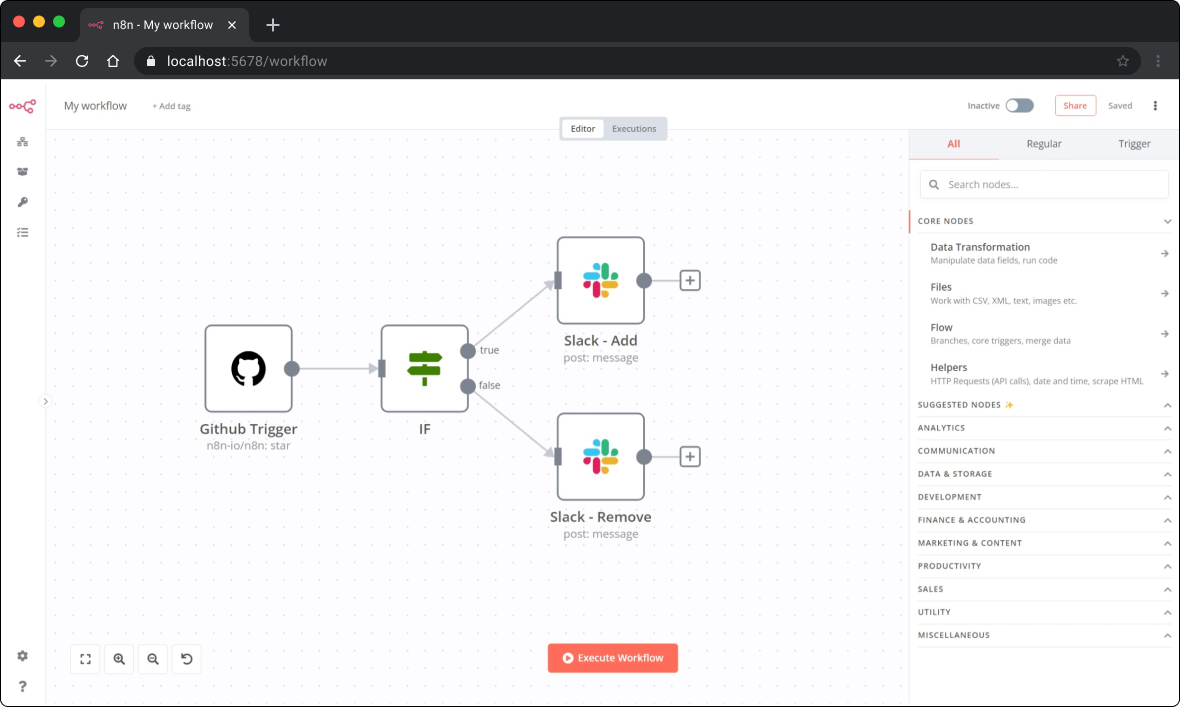
Conversely, n8n operates under a "fair-code" model. Built on Node.js and TypeScript, n8n provides a visual node-graph builder that can be self-hosted on your own infrastructure via Docker, Kubernetes, or bare-metal servers. This architectural distinction fundamentally changes how data is processed, stored, and billed.
Furthermore, n8n grants developers native access to raw JavaScript and Python code nodes, complete node source inspection, and custom internal node development. Make.com provides visual mappers, data transformers, and custom HTTP request modules, but restricts low-level environment runtime modifications.
2. Execution Unit Economics: n8n Workflow Executions vs Make.com Operations
The most profound financial divergence in the n8n vs Make.com evaluation stems from how each platform quantifies consumption metrics. A misunderstanding of unit economics often leads to unexpected budget overruns on managed iPaaS platforms.
Make.com measures usage using Operations. An operation is consumed every single time a module performs an action. If a scenario contains a trigger, two search modules, a router with three branches, an iterator, and four update actions, running that scenario once will consume 10+ operations. If an iterator processes an array of 50 items, each item iteration counts as a distinct operation, rapidly consuming your plan allowance.
On the other hand, n8n Self-Hosted measures usage via Workflow Executions. One execution represents a complete end-to-end run of a workflow, regardless of whether that workflow contains 5 nodes or 100 nodes, or whether a loop processes 1,000 array items.
Consider a business processing 100,000 monthly leads. Each lead triggers an 8-node pipeline: Webhook → Email Verification → Clearbit Lookup → Database Query → Scoring Logic → CRM Update → Slack Notification → Analytics Log.
- Make.com Cost: 100,000 runs × 8 operations = 800,000 operations/month. On Make's Pro/Teams tier, this volume costs approximately $299 to $450/month.
- n8n Self-Hosted Cost: 100,000 workflow executions run on a $20/month Hetzner VPS (2 vCPU, 4GB RAM) with PostgreSQL. Total monthly cost: $20/month (a 93% cost reduction).
| Monthly Event Volume | Workflow Complexity | Make.com Est. Operations | Make.com Monthly Cost | n8n Self-Hosted VPS Cost | Estimated Savings |
|---|---|---|---|---|---|
| 25,000 Workflows | Simple (3 Modules) | 75,000 Ops | $29 / mo | $10 / mo (Basic VPS) | 65% Savings |
| 100,000 Workflows | Medium (8 Modules) | 800,000 Ops | $349 / mo | $20 / mo (Standard VPS) | 94% Savings |
| 500,000 Workflows | Complex (12 Modules) | 6,000,000 Ops | $1,899 / mo | $60 / mo (High-Mem VPS + DB) | 97% Savings |
| 2,000,000 Workflows | Enterprise (15 Modules) | 30,000,000 Ops | $7,500+ / mo (Enterprise) | $180 / mo (Queue Mode Cluster) | 97.6% Savings |
3. Node Limits, Concurrency, and Queue Mode Scaling
When scaling high-throughput automation pipelines, throughput performance and concurrency management are critical technical requirements. In a managed SaaS environment like Make.com, scenario execution times, memory limits, and concurrent thread caps are strictly governed by your plan tier.
Make.com enforces execution timeout caps (typically 40 seconds to 5 minutes depending on tier) and payload size limits. If an API payload exceeds buffer limits or a complex data transformation requires long processing times, Make scenarios may terminate with memory or timeout errors.
In contrast, n8n Self-Hosted offers complete architectural freedom over performance tuning. For enterprise workloads requiring high concurrency, n8n features an advanced Queue Mode setup using Redis as a message broker.
In Queue Mode, n8n separates responsibilities into three distinct process layers:
- n8n Main Process: Serves the web UI, handles workflow editing, and manages scheduled cron triggers.
- Redis Broker: Acts as an in-memory task queue that receives incoming webhook triggers instantly without blocking execution.
- n8n Worker Instances: Stateless worker nodes that pull jobs from Redis and execute workflow nodes in parallel across multiple CPU cores or server instances.
Consequently, an n8n Queue Mode cluster can handle thousands of incoming webhooks per second with zero dropped requests, buffering spikes smoothly during peak traffic hours.
4. Fair-Code Licensing & Enterprise Governance: Sustainable Use License vs Make SaaS
Licensing clarity is paramount when integrating third-party tools into corporate technology stacks. A common area of confusion when evaluating n8n vs Make.com is n8n's license model.
n8n operates under the n8n Sustainable Use License (which replaced its former AGPL v3 with Commons Clause licensing). Under this fair-code license:
- Internal Business Use is 100% Free: Companies can self-host n8n, automate internal business processes, connect internal databases, and build product integrations completely free of license fees.
- Commercial Re-Selling Restricted: You cannot package n8n as a managed workflow automation service and sell access to it to third-party end users for a fee without purchasing an official n8n Enterprise License.
For organizations building internal DevOps automation, CRM data syncing, or AI agent routing, n8n Self-Hosted provides complete legal compliance at zero license cost.
Make.com operates as a standard proprietary SaaS subscription model. While it eliminates self-hosting governance, enterprise features such as single sign-on (SSO/SAML), granular role-based access control (RBAC), audit logging, and dedicated customer success managers are locked behind high-tier Teams and Enterprise contracts.
5. Self-Hosting Infrastructure & True Total Cost of Ownership (TCO)
While n8n eliminates software license costs for internal automation, evaluating true Total Cost of Ownership (TCO) requires accounting for infrastructure server hosting, PostgreSQL database storage, automated backups, and engineering maintenance overhead.
Below is a production-grade Docker Compose configuration for deploying n8n with PostgreSQL and Redis in Queue Mode:
# Production n8n Queue Mode Setup with PostgreSQL & Redis
version: '3.8'

services:
  postgres:
    image: postgres:16-alpine
    restart: always
    environment:
      POSTGRES_USER: n8n_db_user
      POSTGRES_PASSWORD: SecretDBPass2026!
      POSTGRES_DB: n8n_production
    volumes:
      - postgres_data:/var/lib/postgresql/data

  redis:
    image: redis:7-alpine
    restart: always

  n8n-main:
    image: docker.n8n.io/n8nio/n8n:latest
    restart: always
    ports:
      - "5678:5678"
    environment:
      - DB_TYPE: postgresdb
      - DB_POSTGRESDB_HOST: postgres
      - DB_POSTGRESDB_DATABASE: n8n_production
      - DB_POSTGRESDB_USER: n8n_db_user
      - DB_POSTGRESDB_PASSWORD: SecretDBPass2026!
      - EXECUTIONS_MODE: queue
      - QUEUE_BULL_REDIS_HOST: redis
      - N8N_ENCRYPTION_KEY: SuperSecretEncryptionKey32Chars!
      - EXECUTIONS_DATA_PRUNE: true
      - EXECUTIONS_DATA_MAX_AGE: 168 # Prune after 7 days

  n8n-worker:
    image: docker.n8n.io/n8nio/n8n:latest
    restart: always
    command: worker
    environment:
      - DB_TYPE: postgresdb
      - DB_POSTGRESDB_HOST: postgres
      - EXECUTIONS_MODE: queue
      - QUEUE_BULL_REDIS_HOST: redis

volumes:
  postgres_data:
| Cost Category | n8n Self-Hosted (Moderate Volume) | Make.com Pro / Teams Plan |
|---|---|---|
| Cloud Infrastructure / Server | $20 - $40 / mo (Hetzner / AWS t4g.medium) | $0 (Included in SaaS fee) |
| Database & Storage | $10 - $20 / mo (Managed Postgres / S3) | $0 (Included in SaaS fee) |
| Software License Fee | $0 (Sustainable Use License) | $189 - $450 / mo (Based on Ops) |
| DevOps / Maintenance Overhead | ~1-2 hrs / mo ($100 / mo allocated) | $0 (Zero infrastructure maintenance) |
| Total Estimated Monthly Cost | $130 - $160 / mo | $189 - $450+ / mo |
6. Operational Complexity, Maintenance, and Execution Pruning
While n8n Self-Hosted unlocks incredible cost efficiency, ignoring operational maintenance can lead to database degradation. In a default installation, n8n logs full JSON execution payloads for every node run to its PostgreSQL database.
Without automated data pruning, a high-volume n8n server executing 500,000 workflows per month can quickly generate hundreds of gigabytes of execution log data, consuming disk space and slowing down database queries.
To prevent database bloat, DevOps engineers must configure automated retention environment variables in their production deployment:
EXECUTIONS_DATA_PRUNE=true— Enables background pruning of past execution logs.EXECUTIONS_DATA_MAX_AGE=168— Retains execution history for 168 hours (7 days) before purging.EXECUTIONS_DATA_PRUNE_MAX_COUNT=50000— Restricts maximum retained execution records.DB_POSTGRESDB_POOL_SIZE=20— Tunes PostgreSQL connection pooling for concurrent worker nodes.
On Make.com, execution history retention and log purging are managed automatically by the platform vendor, freeing non-technical users from database optimization tasks.
7. Data Sovereignty, Security & Regulatory Compliance
For enterprise organizations operating under strict regulatory regimes such as GDPR in Europe, HIPAA in healthcare, or SOC 2 Type II compliance, data residency and third-party data access represent critical decision factors in the n8n vs Make.com benchmark.
n8n Self-Hosted offers ultimate data sovereignty. Because the entire n8n execution environment resides inside your private virtual private cloud (VPC) or local corporate datacenter:
- Customer PII, health records, and financial transaction payloads never leave your infrastructure boundaries.
- API keys, credentials, and access tokens are encrypted locally using AES-256 via your custom
N8N_ENCRYPTION_KEY. - Workflows can run in completely air-gapped environments without external internet connectivity if required.
Make.com processes all workflow execution data on its multi-tenant European and US cloud infrastructure. While Make adheres to high security standards (ISO 27001, GDPR compliance, SOC 2 Type II reports), sensitive financial or medical payloads must pass through Make's external servers. Custom data residency isolation is typically reserved for enterprise-tier customers.
8. Comprehensive Feature Benchmark Matrix: n8n vs Make.com
| Feature / Specification | n8n Self-Hosted (2026) | Make.com (2026) |
|---|---|---|
| Primary Delivery Model | Self-Hosted Fair-Code (Docker/K8s) / n8n Cloud | Fully Managed SaaS Cloud iPaaS |
| Billing Unit Metric | Workflow Executions (Unlimited Node Steps) | Module Operations (Every Step Charged) |
| Licensing Model | Sustainable Use License (Free for Internal Use) | Proprietary Paid Commercial SaaS |
| Custom Code Support | Native JavaScript (Node.js) & Python Nodes | Basic JavaScript Transformers / Custom Modules |
| Pre-built Connectors | 400+ Native Nodes + HTTP/REST Node | 1,800+ Native App Connectors |
| High Concurrency Scaling | Redis Queue Mode Cluster with Worker Nodes | Managed Cloud Threads (Tier Dependent) |
| Data Sovereignty & Privacy | 100% On-Premise / Private VPC (Air-gapped) | Multi-Tenant Cloud (EU / US Servers) |
| Database & Log Control | Full PostgreSQL Access & Custom Pruning | Managed Platform Log Retention (30-90 Days) |
| Visual Canvas Design | Node-Graph Canvas with Real-Time JSON Debugger | Visual Circular Graph Canvas with Bubbles |
| Error Handling Directives | Continue on Fail, Error Triggers, Sub-workflows | Ignore, Resume, Break, Commit, Rollback |
| Setup & Onboarding Complexity | Moderate to High (Requires DevOps/Docker) | Low (Instant No-Code Sign-up) |
9. n8n vs Make.com Pros and Cons Analysis
n8n Self-Hosted Advantages
- Unbeatable unit economics: Zero per-operation software charges for internal workflows.
- Complete data sovereignty: Payload data stays inside your private VPC or datacenter.
- Unlimited workflow node steps and array loop iterations per execution.
- Native JavaScript and Python runtime nodes for advanced data engineering.
- Horizontal scaling via Redis Queue Mode and stateless Docker workers.
n8n Self-Hosted Drawbacks
- Requires DevOps capability for Docker setup, SSL, and PostgreSQL management.
- Fewer pre-built SaaS app connectors (400+ vs Make's 1,800+).
- Requires active database pruning environment setup to prevent storage bloat.
Make.com Advantages
- Zero infrastructure maintenance: Managed SaaS hosting with instant onboarding.
- Vast connector catalog with over 1,800 pre-configured app integrations.
- Highly granular error handling handlers (Ignore, Resume, Break, Rollback).
- Extremely intuitive visual builder interface suitable for non-technical users.
Make.com Drawbacks
- Operation pricing becomes prohibitively expensive at high volume.
- Array iterators and multi-step routers burn operations rapidly.
- Third-party cloud data processing may conflict with strict data sovereignty mandates.
10. Strategic Decision Framework: When to Choose n8n vs Make.com
Selecting the ideal workflow automation engine depends on your organization's technical maturity, workflow volume, and compliance requirements.
Choose n8n Self-Hosted if:
- You execute heavy, multi-step data transformation pipelines running tens of thousands of monthly workflows.
- Your engineering team has Docker and basic DevOps capabilities to manage a virtual server and PostgreSQL.
- Strict GDPR, HIPAA, or corporate security policies mandate that API credentials and payload data remain strictly within your private cloud.
- You require custom JavaScript/Python code execution within automation steps.
Choose Make.com if:
- Your team consists primarily of non-technical operators or marketers who require instant, no-code automation.
- You rely heavily on niche SaaS applications that are pre-integrated into Make's 1,800+ connector library.
- Your workflow volume is moderate (under 50,000 operations/month) where SaaS convenience outweighs server maintenance cost.
- You prefer fully managed cloud uptime without handling server security patches or database backups.
Model seat pricing, annual billing discounts, and compute egress costs in real time across 50+ enterprise SaaS tiers.
Editorial Contact & Infrastructure Advisory
Have questions regarding n8n queue cluster architecture, PostgreSQL pruning tuning, or Make.com migration benchmarks? Reach out to our technical research analysts at contact@cloudbizstack.com.