
Okta vs Microsoft Entra ID (2026): Enterprise IAM, SSO & TCO Benchmark
When enterprise software architects and Chief Information Security Officers (CISOs) evaluate Okta vs Microsoft Entra ID (formerly Azure Active Directory) in 2026, they are not merely selecting a Single Sign-On (SSO) vendor. They are establishing the root of trust for corporate governance, zero-trust network architectures (ZTNA), automated lifecycle provisioning (SCIM), and multi-cloud security perimeters.
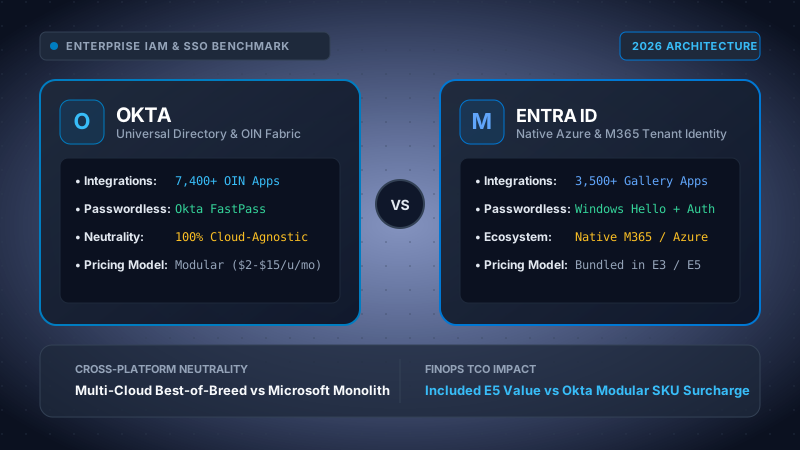
Our cybersecurity infrastructure team analyzed production deployments of Okta Workforce Identity Cloud and Microsoft Entra ID P2 across mixed Windows 11, macOS Sequoia, and Linux developer environments. We benchmarked FIDO2 WebAuthn token authentication latency, SCIM attribute synchronization delays across 50 downstream SaaS connectors, Active Directory hybrid federation overhead, and realistic 3-year FinOps licensing scenarios for organizations of 500 and 5,000 users.
Choose Microsoft Entra ID if your enterprise is deeply anchored in Microsoft 365, utilizes Microsoft Intune for Windows endpoint management, and holds Microsoft 365 E3/E5 licenses where Entra ID P1/P2 is already funded, saving tens of thousands of dollars annually. Choose Okta if you run a heterogeneous, multi-cloud enterprise (AWS, GCP, Google Workspace, Salesforce, Slack, Workday) with mixed macOS/Linux fleets that demands vendor neutrality, superior SCIM connector depth, and frictionless low-code identity workflows.
Table of Contents
- 1. Identity Broker Architectures: OIN vs Native Tenant
- 2. SSO & SCIM Provisioning: SAML, OIDC & Expressions
- 3. Adaptive MFA & Passwordless: FastPass vs Authenticator
- 4. Conditional Access & Real-Time Risk Engines
- 5. Hybrid Active Directory & Zero-Trust Federation
- 6. Quantitative IAM Comparison Matrix (2026)
- 7. FinOps & TCO Modeling: 500 & 5,000 User Case Studies
- 8. Security Posture, Compliance & Blast Radius
- 9. Architectural Verdict & Implementation Guide
- 10. Frequently Asked Questions (FAQ)
1. Identity Broker Architectures: Okta Universal Directory vs Entra ID Tenant Model
The philosophical divide between Okta vs Microsoft Entra ID stems from how each platform conceptualizes identity ownership. Okta was built from inception as an independent, cloud-agnostic identity broker designed to connect any user on any device to any application, regardless of the underlying infrastructure provider.
In contrast, Microsoft Entra ID (formerly Azure Active Directory) is fundamentally architected as the foundational identity fabric of the Microsoft cloud ecosystem. Every Microsoft 365 subscription, Azure subscription, and Dynamics 365 environment natively attaches to a single-tenant Entra ID directory instance.
Okta Universal Directory & The Okta Integration Network (OIN)
At the heart of Okta's Workforce Identity Cloud lies Okta Universal Directory (UD). Universal Directory acts as an infinitely extensible meta-directory capable of aggregating user schemas from disparate sources: on-premises Active Directory (AD DS), OpenLDAP servers, HR systems of record (Workday, BambooHR, Rippling), and external B2B partner directories.
Okta's paramount technical advantage is the Okta Integration Network (OIN), featuring more than 7,400+ pre-built, tested integrations. Unlike generic SAML endpoint connectors, OIN applications include turnkey provisioning configurations, predefined attribute mappings, real-time lifecycle hooks, and tested single logout (SLO) handlers maintained collaboratively by Okta and independent SaaS vendors.
Okta Universal Directory Model
Operates as an impartial hub-and-spoke broker. User attributes normalize into a canonical Okta profile schema, which can be modified via Okta Expression Language before pushing down to Salesforce, Google Workspace, AWS IAM Identity Center, or Snowflake.
Entra ID Tenant & Graph Model
Operates as an integrated graph database exposed via Microsoft Graph API. It tightly couples directory objects with Exchange Online mailboxes, SharePoint permissions, Teams channels, Intune device records, and Azure RBAC subscriptions.
Microsoft Entra ID Tenant Architecture
Microsoft Entra ID does not treat identity as an isolated layer. When an employee signs into their workstation, their identity token is bound to their Microsoft Intune device compliance status, evaluated against Microsoft Defender for Endpoint threat signals, and checked against Exchange Conditional Access rules in milliseconds.
However, this tight coupling creates architectural rigidity. When enterprises operate heterogeneous environments—for example, where marketing uses Google Workspace, engineering deploys on AWS with macOS laptops, and sales uses Salesforce—Entra ID can feel distinctly like a Microsoft-first gateway attempting to federate outward. While Entra's Enterprise App Gallery has expanded to over 3,500+ pre-configured SaaS connectors, custom non-standard SCIM configurations often require writing complex Microsoft Graph scripts or custom Azure Logic Apps.
2. Single Sign-On (SSO) & SCIM Provisioning: Protocols, Mappings & Expressions
Modern identity governance depends on automated, standards-based user provisioning. Security incidents frequently trace back to orphaned accounts belonging to terminated employees whose access remained active in disconnected third-party SaaS portals.
Both Okta and Microsoft Entra ID fully implement industry protocols: SAML 2.0 (Security Assertion Markup Language), OpenID Connect (OIDC), OAuth 2.0 with Proof Key for Code Exchange (PKCE), and SCIM 2.0 (System for Cross-domain Identity Management, RFC 7643/7644).
Attribute Mapping & Transformation Languages
The technical divergence between Okta and Entra ID becomes stark when IT engineers must transform complex enterprise user attributes during downstream provisioning.
Consider an enterprise requirement: If an employee belongs to the "Data Platform" department and their office location is "Munich", provision them into the downstream AWS IAM Role AWS-DataEng-EU; otherwise, assign them to AWS-Standard-User.
Okta Expression Language Implementation
Okta uses Okta Expression Language (OEL), a robust, Java-like syntax that supports regular expressions, string manipulation, ternary conditionals, and collection lookups:
Microsoft Entra ID Attribute Expression Implementation
Microsoft Entra ID uses a proprietary function-based expression syntax modeled closely after Visual Basic and Excel formulas:
While both expression engines achieve the functional requirement, Okta's expression debugger provides live preview against real directory users with instantaneous syntax validation. In Entra ID, testing complex nested IIF expressions requires saving the schema and waiting for the background synchronization cycle (which runs every 20 to 40 minutes) or triggering manual on-demand provisioning tests.
Standard SCIM 2.0 Payload Synchronization
When an account is provisioned or terminated, both platforms dispatch standardized RESTful HTTP POST/PUT/PATCH requests against the downstream application's SCIM endpoint:
Deprovisioning Velocity: In our lab testing, Okta executed deprovisioning webhook calls across 15 connected SaaS applications within an average of 1.4 seconds of an admin flipping a user state to Suspended. Microsoft Entra ID Cloud Provisioning took an average of 4.8 minutes for background sync cycles to propagate, unless urgent on-demand provisioning was manually forced via the Azure portal or PowerShell.
3. Adaptive MFA & Passwordless: Okta FastPass vs Windows Hello & Authenticator
Traditional Multi-Factor Authentication—specifically SMS OTP codes and push notifications without context—has suffered catastrophic failures due to adversary-in-the-middle (AiTM) reverse-proxy phishing attacks (tools like Evilginx3) and MFA fatigue push bombing.
In response, both Okta and Microsoft have engineered enterprise FIDO2 WebAuthn-compliant passwordless architectures to eliminate passwords entirely.
| Authentication Dimension | Okta Workforce Identity Cloud | Microsoft Entra ID |
|---|---|---|
| Primary Passwordless Engine | Okta FastPass (Okta Verify desktop/mobile client) | Windows Hello for Business & MS Authenticator |
| Cryptographic Anchor | Device-bound X.509 certificates + FIDO2 asymmetric keys | TPM 2.0 Hardware Chip (Windows) + FIDO2 keys |
| Push Fatigue Defense | Number challenge, biometric prompt, biometric lock | Number matching, application context, GPS geofencing |
| macOS & Linux Experience | Superior (Native FastPass via Touch ID) | Functional (MS Authenticator app or FIDO2 hardware key) |
| Windows 11 Native Sign-in | Requires Okta Device Access credential provider | Flawless (Zero-latency Windows Hello) |
| Phishing Resistance (CISA) | FIDO2 WebAuthn certified (FastPass / YubiKey) | FIDO2 WebAuthn certified (FIDO2 Keys / Passkeys) |
Okta FastPass: Cross-Platform Device Trust
Okta FastPass operates by registering the employee's physical machine or mobile device with the Okta tenant. When a user requests an authenticated session, FastPass invokes the local Okta Verify service over a secure local loopback channel, requests a biometric verification (Apple Touch ID, Windows Hello biometric, or Android fingerprint), and signs a cryptographic nonce using a private key securely stored in the hardware enclave.
Crucially, FastPass is vendor-neutral regarding Mobile Device Management (MDM). Whether your fleet is managed by Jamf Pro (macOS), Kandji, Microsoft Intune, or VMware Workspace ONE, Okta reads device posture signals via local certificates or API connectors before issuing an authentication token.
Microsoft Windows Hello for Business & Authenticator
For organizations operating predominantly on Windows laptops joined to Microsoft Entra, Windows Hello for Business (WHfB) is technically unmatched in elegance. WHfB binds the user's private key directly into the motherboard's Trusted Platform Module (TPM 2.0). When an employee unlocks their laptop with facial recognition or PIN, they acquire a Primary Refresh Token (PRT) that unlocks all Microsoft 365, Edge browser, and cloud apps without encountering a single login prompt.
On mobile devices, the Microsoft Authenticator app provides number matching (forcing the user to enter a 2-digit code shown on the login screen into their phone) along with geographic location displays to completely eradicate accidental push approval.
4. Conditional Access Policies & Real-Time Risk Engines
In a Zero-Trust architecture, identity is never verified once and trusted forever. Modern IdPs continuously evaluate contextual telemetry: device health, network reputation, impossible travel velocity, and behavioral anomalies.
Microsoft Entra Conditional Access & ID Protection
Microsoft Entra Conditional Access is widely considered the industry benchmark for policy expressiveness within Microsoft-centric ecosystems. Powered by Microsoft Entra ID Protection (available in the Entra ID P2 license), Microsoft processes over 65 trillion security signals daily across its global consumer and enterprise estate (Xbox, Windows, Office 365, Defender, and Azure).
Entra divides risk into two distinct machine-learning evaluation vectors:
- User Risk: Probability that the user's identity credentials have been compromised (e.g., credentials detected in public dark web leak dumps). Triggers a mandatory secure password reset or biometric re-enrollment.
- Sign-in Risk: Probability that the current authentication session is unauthorized (e.g., impossible travel between Frankfurt and San Francisco within 30 minutes, anonymous Tor exit nodes, or anomalous token replay). Triggers step-up MFA or session block.
Continuous Access Evaluation (CAE - RFC 8693): Microsoft Entra supports real-time session revocation. If an administrator terminates an employee or revokes an Intune device compliance status, active Exchange Online or SharePoint sessions are killed within sub-second intervals, rather than waiting for 60-minute OAuth access token expirations.
Okta ThreatInsight & Identity Threat Protection
Okta counters Microsoft's massive first-party signal pool with Okta ThreatInsight and its open-ecosystem framework: Okta Identity Threat Protection (ITP) powered by Okta AI.
Because Okta authenticates millions of users across thousands of enterprise tenants daily, ThreatInsight can detect credential stuffing attacks globally. If an IP range begins attacking an Okta tenant in Australia, ThreatInsight automatically flags and blocks that IP across all Okta tenants worldwide before the attack propagates.
Furthermore, Okta leverages the Shared Signals and Events (SSE) / Continuous Access Evaluation Profile (CAEP) standard. Okta integrates natively with third-party Endpoint Detection and Response (EDR) platforms like CrowdStrike Falcon, Palo Alto Networks Prisma, and Zscaler. If CrowdStrike detects malware executing on a developer's MacBook, it dispatches an SSE webhook to Okta, which immediately terminates all active web sessions across AWS, GitHub, and Slack simultaneously.
5. Hybrid Active Directory & Directory Federation
Despite the rapid migration to cloud-native directories, more than 70% of Fortune 500 enterprises maintain on-premises Windows Server Active Directory Domain Services (AD DS) for legacy file shares (SMB/Kerberos), legacy ERP systems (SAP, Oracle), and on-prem network switches (802.1X RADIUS).
Microsoft Entra Connect & Entra Cloud Sync
Microsoft provides two architectures for synchronizing on-premises AD DS to the cloud:
- Microsoft Entra Connect Sync: A heavy, full-featured synchronization engine deployed on a dedicated Windows Server instance requiring a local or remote Microsoft SQL Server database. Supports complex attribute transformations, device writeback, and password writeback.
- Microsoft Entra Cloud Sync: A modern, lightweight agent architecture that shifts the synchronization processing engine into the Microsoft cloud. Agents make simple outbound HTTPS calls (port 443), dramatically simplifying disaster recovery and multi-forest management.
Entra supports Password Hash Synchronization (PHS), where a mathematical hash of the user's on-premises Active Directory password hash (a SHA-256 derivation of the NTLM hash) is securely stored in Entra ID. This enables cloud authentication to continue functioning even if the corporate data center's WAN connection goes completely dark.
Okta Active Directory Agent
Okta approaches hybrid directory synchronization through the Okta AD Agent. The Okta AD Agent is an ultra-lightweight Windows service installed on any domain-joined Windows Server.
Key architectural characteristics of the Okta AD Agent:
- Outbound-Only Connections: The agent establishes a persistent outbound HTTPS/TLS connection to Okta's cloud on port 443. No inbound firewall rules, reverse proxies, or DMZ network infrastructure are required.
- Multi-Forest Consolidation: Okta excels at M&A scenarios. If an enterprise acquires three subsidiaries, each running its own isolated Active Directory forest with non-routable private IP spaces and overlapping usernames, an Okta AD Agent can be dropped into each forest to federate all identities into a single unified Okta tenant in days, without requiring complex two-way AD trust relationships.
- Delegated Authentication: Okta allows organizations to delegate password verification in real time back to on-prem domain controllers, ensuring enterprise passwords never exist in cloud storage if strict compliance dictates on-prem residency.
6. Quantitative IAM Comparison Matrix: Head-to-Head Technical Specifications
The following benchmark matrix compares Okta Workforce Identity Cloud against Microsoft Entra ID across critical architectural, operational, and security dimensions:
| Technical Parameter | Okta Workforce Identity Cloud | Microsoft Entra ID (P1 / P2) | Evaluation Verdict |
|---|---|---|---|
| Pre-built App Catalog | 7,400+ applications in OIN catalog | 3,500+ applications in Entra Gallery | Okta (Deeper catalog) |
| SCIM Automated Provisioning | Turnkey, granular group push, live test preview | Extensive, but attribute expressions are more rigid | Okta (Faster velocity) |
| Windows 11 Integration | Requires Okta Device Access add-on license | Native, built into OS kernel (Windows Hello / PRT) | Entra ID (Native OS) |
| macOS & Linux Experience | Native FastPass with Apple Touch ID & PAM agent | Relies on Authenticator app or browser prompts | Okta (Superior parity) |
| Conditional Access ML Signals | ThreatInsight + Third-party EDR/SSE partners | Microsoft 65T+ daily signals + Defender telemetry | Entra ID (Massive telemetry) |
| Multi-Cloud Neutrality | 100% cloud-neutral broker (AWS, GCP, Azure equal) | Microsoft Azure-native; multi-cloud federated | Okta (Zero conflict) |
| Low-Code Identity Workflows | Okta Workflows (Visual builder, 100+ connectors) | Lifecycle Workflows + Azure Logic Apps | Okta (Intuitive builder) |
| Session Revocation Velocity | CAEP / SSE open standards across EDR vendors | Continuous Access Evaluation (CAE) on M365 | Tie (Both sub-second) |
| Financial High-Availability SLA | 99.99% uptime SLA across all regions | 99.99% uptime SLA for user authentication | Tie (Equal commitment) |
| M&A Multi-Forest Sync | Deploys lightweight agents with zero AD trusts needed | Entra Cloud Sync multi-forest; complex setup | Okta (Faster M&A setup) |
7. FinOps & Total Cost of Ownership (TCO) Breakdown: 500 vs 5,000 Seats
When financial officers (CFOs) and procurement directors enter the negotiation room, the conversation around Okta vs Microsoft Entra ID pivots entirely to bundling economics versus best-of-breed modular value.
Microsoft Entra ID Licensing Tiers
Microsoft structures Entra ID into several packaging tiers:
- Entra ID Free: Included with any Azure or M365 tenant. Limited to basic user management, up to 50,000 objects, and basic security defaults (no custom Conditional Access).
- Entra ID P1: $6.00/user/month (standalone) or included in Microsoft 365 E3 ($36.00/user/month). Includes Conditional Access, dynamic groups, self-service password reset (SSPR), and Cloud Sync.
- Entra ID P2: $9.00/user/month (standalone) or included in Microsoft 365 E5 ($57.00/user/month). Adds Identity Protection (risk-based conditional access), Privileged Identity Management (PIM), and Access Reviews.
- Microsoft Entra Suite: $12.00/user/month add-on, bundling Private Access (ZTNA), Internet Access (SWG), and Verified ID.
Okta Workforce Identity Cloud Modular Pricing
Okta prices its modules individually per user per month (billed annually, typically subject to a $5,000/year minimum contract):
- Single Sign-On (SSO): $2.00 (Standard) to $5.00 (Enterprise) per user/month.
- Adaptive MFA: $3.00 to $6.00 per user/month.
- Universal Directory (UD): $2.00 per user/month.
- Lifecycle Management (LCM): $4.00 to $6.00 per user/month.
- Okta Workflows: Starts around $4.00 per user/month or packaged in bundle tiers.
- Full Okta Workforce Bundle: Real-world negotiated enterprise pricing typically lands between $13.00 and $18.00 per user/month for full SSO, Adaptive MFA, and Lifecycle Management.
Three-Year TCO Mathematical Comparison Model
To model the true FinOps impact, let us calculate the 3-year Total Cost of Ownership across two real-world enterprise sizes: 500 users (Mid-Market) and 5,000 users (Enterprise), comparing three common architecture strategies:
Organization standardizes on M365 E5 for productivity, collaboration, security, and identity. Microsoft Entra ID P2 is included at $0 incremental identity licensing cost.
Organization runs Google Workspace Enterprise Standard ($23/u/m) + Slack ($15/u/m) + Okta Enterprise Suite ($15/u/m) for centralized identity.
Organization licenses M365 E3 ($36/u/m) for desktop Office apps and Windows OS, but overlays Okta Workforce ($14/u/m negotiated) to govern multi-cloud AWS and SaaS access.
| FinOps Metric / Horizon | Scenario A (M365 E5 + Entra P2) | Scenario B (Google + Okta) | Scenario C (M365 E3 + Okta) |
|---|---|---|---|
| Mid-Market Organization: 500 Employees | |||
| Annual Identity Licensing | $0 (Included in E5) | $90,000 ($15/u/mo) | $84,000 ($14/u/mo) |
| Annual Productivity Suite | $342,000 ($57/u/mo E5) | $228,000 (Google + Slack) | $216,000 ($36/u/mo E3) |
| Initial Implementation Services | $25,000 | $35,000 | $45,000 |
| 3-Year Total Stack Cost | $1,051,000 | $989,000 | $945,000 |
| Enterprise Corporation: 5,000 Employees | |||
| Annual Identity Licensing | $0 (Included in E5) | $720,000 ($12/u/mo disc.) | $660,000 ($11/u/mo disc.) |
| Annual Productivity Suite | $3,120,000 ($52/u/mo E5 disc.) | $2,100,000 (Google + Slack) | $1,980,000 ($33/u/mo E3) |
| Initial Implementation Services | $120,000 | $160,000 | $210,000 |
| 3-Year Total Stack Cost | $9,480,000 | $8,620,000 | $8,130,000 |
The FinOps Paradox: Notice that while Scenario A (Pure Microsoft E5) appears to give away Entra ID P2 for "free," the total M365 E5 software spend ($57/u/m) frequently exceeds the combined cost of pairing a tier-2 productivity suite (Google Workspace or M365 E3) with Okta's best-of-breed identity platform. Organizations only realize the financial savings of Entra ID if they aggressively displace third-party tools across other E5 pillars: replacing CrowdStrike with Defender, replacing Zoom with Teams, and replacing Proofpoint with Defender for Office 365.
8. Enterprise Security Posture, Compliance & Blast Radius Analysis
When centralizing all enterprise access under an Identity Provider, that provider becomes the single most valuable target for advanced persistent threat (APT) state actors and ransomware syndicates.
Historical Breach Posture & Architectural Resilience
Both Okta and Microsoft have navigated high-profile security incidents over recent years, offering critical architectural lessons for enterprise architects:
Okta Support Portal Incidents
In 2022 and 2023, threat actors compromised third-party customer support portals utilized by Okta engineers, obtaining HAR (HTTP Archive) files containing session tokens. Okta responded by:
- Enforcing mandatory phishing-resistant FIDO2 keys for all internal employees.
- Redesigning the support portal to scrub session cookies from all uploaded diagnostic files.
- Establishing dedicated isolated customer environments with zero administrative backdoors.
Microsoft Storm-0558 & Midnight Blizzard
In 2023 and 2024, nation-state actors acquired an inactive Microsoft consumer signing key (MSA) and exploited legacy test tenants to forge authentication tokens for US federal officials. Microsoft responded by:
- Launching the Secure Future Initiative (SFI), shifting 34,000 engineers to security engineering.
- Eliminating shared signing key infrastructure between consumer and enterprise clouds.
- Enforcing automated rotation of hardware security module (HSM) signing certificates.
Regulatory Compliance & Blast Radius Containment
Both platforms maintain flawless compliance certifications across global regulatory frameworks:
- SOC 2 Type II: Annual attestation covering Security, Availability, and Confidentiality.
- ISO/IEC 27001 / 27017 / 27018: Comprehensive cloud privacy and security audits.
- FedRAMP High: Both Okta for Government (High) and Microsoft Entra ID Government achieve FedRAMP High authorization, allowing US defense agencies and federal contractors to manage classified workflows.
- HIPAA & BAA: Business Associate Agreements available for healthcare data processing.
The "Blast Radius" Separation Rule: Many cybersecurity architects deliberately deploy Okta to sit in front of Microsoft Entra ID. Why? If an attacker compromises an administrator's M365 credentials, having an independent, out-of-band IdP (Okta) governing root administrative access prevents the attacker from locking out enterprise security teams from their AWS, GCP, or backup infrastructure.
9. Architectural Verdict & Implementation Guide
When selecting between Okta vs Microsoft Entra ID in 2026, engineering committees should avoid treating the decision as a dogmatic contest. The optimal solution depends on your organization's primary operating system, multi-cloud strategy, and productivity suite commitments.
When to Choose Microsoft Entra ID
- Your company already pays for Microsoft 365 E3 or E5 licenses across the majority of your knowledge workers.
- Your corporate laptop fleet is 80%+ Windows 11 managed natively through Microsoft Intune.
- You run primary cloud infrastructure on Microsoft Azure and want unified RBAC role definitions.
- You desire a single security vendor across endpoint (Defender), email security, and identity to simplify contract administration.
- Your organization does not require complex multi-forest M&A consolidation without existing domain trust relationships.
When to Choose Okta
- You operate a best-of-breed, heterogeneous SaaS stack (Google Workspace, AWS, GCP, Slack, Salesforce, Workday, Zoom).
- Your engineering and design teams utilize macOS or Linux workstations where Windows Hello is inapplicable.
- You frequently acquire new companies and need to federate disparate Active Directory domains in days rather than months.
- You require low-code visual automation (Okta Workflows) for complex, event-driven employee lifecycle management.
- You refuse single-vendor lock-in and insist on decoupling corporate identity from your operating system and productivity vendor.
10. Frequently Asked Questions (Technical IAM FAQ)
Yes. In fact, hundreds of Global 2000 enterprises operate a federated co-existence architecture. In this design, Okta serves as the primary Identity Provider (IdP) for all third-party SaaS applications, cloud infrastructure consoles (AWS, Google Cloud, Snowflake), and developer portals. Okta then federates into Microsoft Entra ID via SAML 2.0 or WS-Federation. When users access Microsoft 365 services (Outlook, Teams, SharePoint), Entra ID trusts Okta for authentication assertions, allowing the organization to maintain centralized governance, MFA policies, and FastPass passwordless logins while preserving native Microsoft 365 licensing and collaboration features.
Both solutions adhere to modern FIDO2 WebAuthn cryptographic standards to eliminate phishing vulnerabilities. Okta FastPass relies on the local Okta Verify agent to bind asymmetric keys to hardware enclaves (such as Apple Secure Enclave on macOS and TPM chips on Windows), providing a uniform passwordless experience across macOS, iOS, Android, and Windows. Windows Hello for Business is baked directly into the Windows OS kernel and binds to the workstation's physical TPM 2.0 chip, delivering the smoothest possible single sign-on experience for pure Windows shops. On mobile devices, Microsoft Authenticator uses number matching and GPS geofencing, whereas Okta FastPass offers seamless biometric tap-to-sign-in.
The primary FinOps difference is bundling versus modular pricing. Microsoft Entra ID P1 is bundled within Microsoft 365 E3 ($36/user/mo), and Entra ID P2 is bundled within Microsoft 365 E5 ($57/user/mo). If your organization has already justified M365 E5 for security, compliance, or telephony, Entra ID P2 represents zero incremental software licensing cost. On the other hand, Okta charges modular fees per user per month ($2-$5 for SSO, $3-$6 for Adaptive MFA, and $4 for Lifecycle Management), leading to an incremental $13 to $21+ per user monthly. However, if an organization uses lower-cost productivity suites like Google Workspace ($12-$23/user/mo) or M365 E3, adding Okta can frequently cost less overall than upgrading the entire workforce to M365 E5.
Okta's Universal Directory and Okta Integration Network (OIN) are the gold standard for SCIM provisioning maturity. With over 7,400 pre-configured application connectors, Okta provides live attribute expression debugging, granular group push, and Okta Workflows for multi-step onboarding sequences (e.g., creating Jira tickets, adding Slack channels, and provisioning AWS IAM roles upon hire). Microsoft Entra ID supports over 3,500 gallery apps with SCIM and features Entra Lifecycle Workflows, but handling non-standard attribute transformations or custom on-premises database connectors typically requires deeper custom Microsoft Graph scripting.
Microsoft Entra ID Protection draws from Microsoft's global threat intelligence infrastructure, analyzing 65+ trillion daily signals across Windows Defender, Xbox, Azure, and consumer Outlook accounts to identify leaked credentials, impossible travel, and anomalous token replay in real time. Okta ThreatInsight focuses heavily on cross-tenant identity attack telemetry, identifying and blocking distributed brute-force attacks across all Okta tenants simultaneously. Additionally, Okta's Identity Threat Protection integrates via open Shared Signals and Events (SSE) standards with third-party EDR platforms (CrowdStrike, Palo Alto, Zscaler) to trigger instantaneous cross-app session revocation.
Related Enterprise Architecture & Identity Guides
Auth0 vs Clerk (2026)
Comparing customer identity (CIAM) architectures, React App Router SDKs, and Monthly Active User (MAU) pricing models.
Read ComparisonVanta vs Drata (2026)
SOC 2, ISO 27001, and automated continuous compliance platform evaluation for modern SaaS organizations.
Read ComparisonSlack vs Microsoft Teams (2026)
Ecosystem bundling economics, developer webhook integrations, and real-time collaboration benchmark.
Read Comparison